Enable VIP for Web Access
- Navigate to the directory <avx_installed_path>/conf
-
Go to the appviewx.conf file using the following command to add the new
plugin to be installed:
$ vi appviewx.conf -
Update WEB_VIP_ENABLED as TRUE and update the external VIP
details under APPVIEWX_WEB_VIP
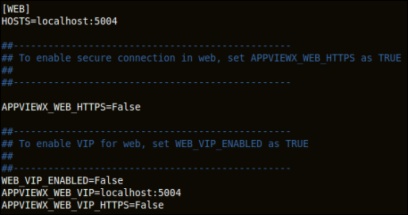
-
When you are done editing the fields, press the Esc key, then type
:wqto save and quit the file.$ appviewx --conf-sync.Note: In case of multi node, run the following command to update the changes across all the cluster nodes:$ appviewx --conf-sync