Import Users
-
Click
 and select Account > User.
-
Click
 on the top.
-
On the Import screen, click the Browse button and go to the location of
the user file, select it and click Open.
Note: The file must be in .csv format. To download a sample template file click
 on the top-right
corner.Note: The most efficient way to import user details is to download the sample import file that is available by clicking in the Command bar of the Import screen,
modify the contents, save it, and then import it into the system. This reduces the
chance that error messages appear during the import process.
on the top-right
corner.Note: The most efficient way to import user details is to download the sample import file that is available by clicking in the Command bar of the Import screen,
modify the contents, save it, and then import it into the system. This reduces the
chance that error messages appear during the import process. -
On the Import screen, click the Upload icon to see the user details
displayed in the user interface. Note, at this point, the user details have not been
imported yet: it's displayed for review.
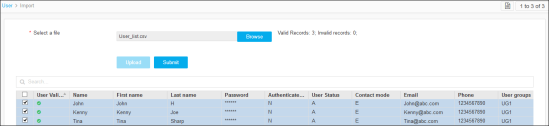
- Review the details of each user in the import file. If you do not want to import specific users, deselect the checkboxes beside their names.
- Click Submit.