Statistics Settings
Configures the statistics data collection to monitor the historic statistics with respect to the vendors and object types. Statistics plugin has to be deployed in the node for collecting statistics data.
To configure statistics,
-
Click
Menu > ADC+ > SETTINGS > Module Settings > ADC > Statistics.
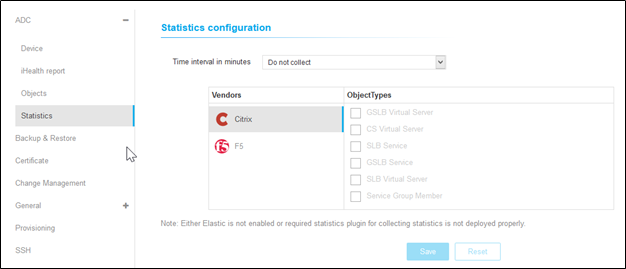
- On the Statistics Configuration details page, choose the time from the Time Interval in Minutes drop-down.
- Select the vendor and choose the object types from the list for which statistics must be fetched from the device.
-
Click Save.
AppViewX collects the stats, aggregates them, and provides out-of-the-box reports in the form of dashboards.Note: To discard the changes, click Reset.
-
Select the default view for the Traffic statistics widget from the Default
View dropdown. The possible options for default view are:
-
Day (default)
-
Live
-
Week
-
Month
-
Quater
-
-
Click Save.
AppViewX collects the stats, aggregates them, and provides out-of-the-box reports in the form of dashboards.Note: To discard the changes, click Reset.