Overview
Device certificate inventory is where all the management interface certificates will be maintained. Currently, in this inventory, only F5 vendor certificates are shown.
On the Certificate Inventory > Device Certificate page, all the code signing certificates are listed. You can perform the following actions:
- Export Certificates - To export the device certificate
- DeleteCertificates - To delete the device certificate
- DeleteCertificates via Holistic View - To delete the device certificate via holistic view
- Assign CertificateGroup - To assign a group to the device certificate
- Unassign CertificateGroup - To Unassign a group from the device certificate
- Add/Modify Comments - To add/modify comments to the device certificate
- Update Certificate Attribute - To update certificate attributes for the device certificate.
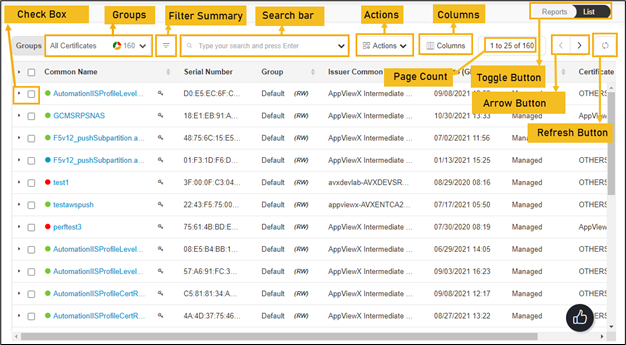
The following table describes the options available on the device certificate inventory page:
| Options | Description | ||||||||||||||||||||||||||||||||||||||
|---|---|---|---|---|---|---|---|---|---|---|---|---|---|---|---|---|---|---|---|---|---|---|---|---|---|---|---|---|---|---|---|---|---|---|---|---|---|---|---|
| Check Box | Select the check box of the certificate that needs to be renewed. | ||||||||||||||||||||||||||||||||||||||
| Groups |
Displays the group of certificates that needs to be displayed as selected. 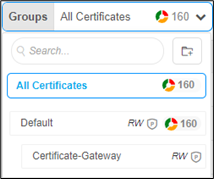
|
||||||||||||||||||||||||||||||||||||||
| Filter Summary |
Displays number of certificates in which state. 
|
||||||||||||||||||||||||||||||||||||||
| Search Bar (Basic/Advanced) |
Searches for the given keyword in the field and results in the feature that matches the search keyword. Basic Search - Searches in the given keyword in the field and results from the feature that matches the search keyword. Advanced Search - The advanced search is used to perform quick searches of the data. If a more specific needs to be composed, the advanced search bar is a readily available option. To activate the advanced search bar, click the Chevron icon in the search field. The advanced search page appears. 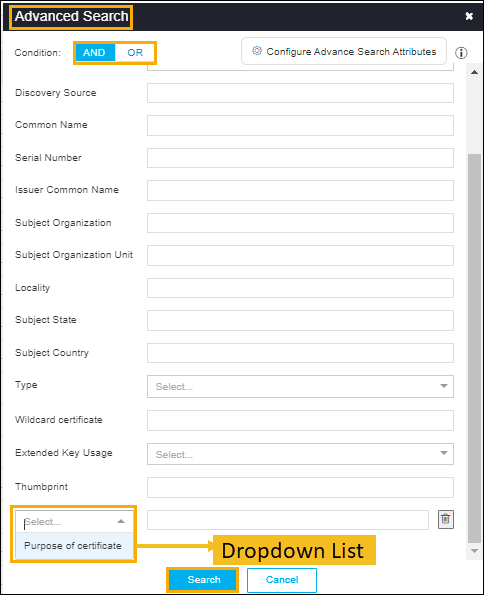
The following table describes the options available in the Advanced Search feature:
|
||||||||||||||||||||||||||||||||||||||
| Actions |
Displays the list of actions. The possible actions are,
|
||||||||||||||||||||||||||||||||||||||
| Columns |
Allows you to select the number of desired columns to show on the certificate page. 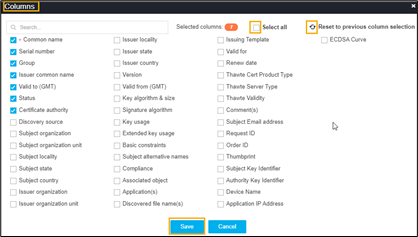
|
||||||||||||||||||||||||||||||||||||||
| Page Count | Displays the number of certificates listed on the page. | ||||||||||||||||||||||||||||||||||||||
| Toggle Button |
Displays the desired dashboard report on the page. The available options are,
|
||||||||||||||||||||||||||||||||||||||
| Arrow Button | Allows you to move next page. | ||||||||||||||||||||||||||||||||||||||
| Refresh Button | Allow you to refresh the current page. |