Create Dashboard
To create a dashboard:
- Click the Menu (
 ) icon.
 - Click CERT+.
The CERT+ left navigation pane appears.
- Click Dashboard in the left navigation pane.
- Click the Create (+) icon in the command bar.
The Create dashboard/widget window appears.
- Enter the field information in the Create dashboard/widget window.
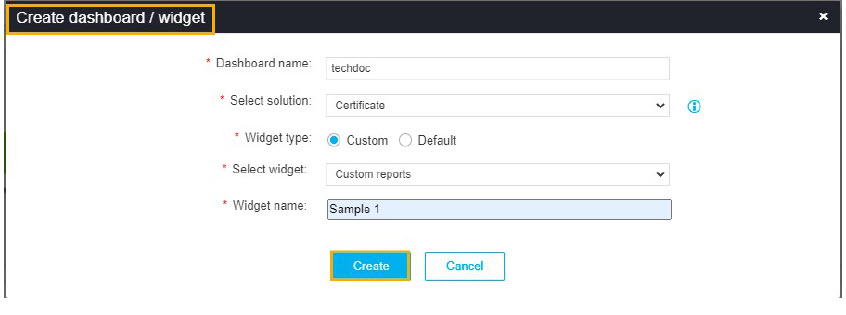 The following table provides the field description to create a dashboard:
Field Description *Dashboard name Name of the dashboard. *Select solution ADC is the select solution. *Widget type Type of the widget. Options are:
- Custom: Choose this option to create a customized widget. By default, this option is selected.
- Default: Choose this option to select the default widget. When you choose this option, the Choose widgets option appears, which allows you to select the widgets.
*Select widget Customized widgets appear in the drop-down menu. Select the appropriate widget. *Widget name Name of the widget. Note: Fields marked with red asterisk (*) symbol are mandatory. - To create a dashboard/widget, click Create.