Configuring GoDaddy
To configure the GoDaddy CA,
- Log in to AppViewX application with valid credentials.
-
Click the menu button located in the upper left corner of the screen.
The left navigation pane is displayed.
-
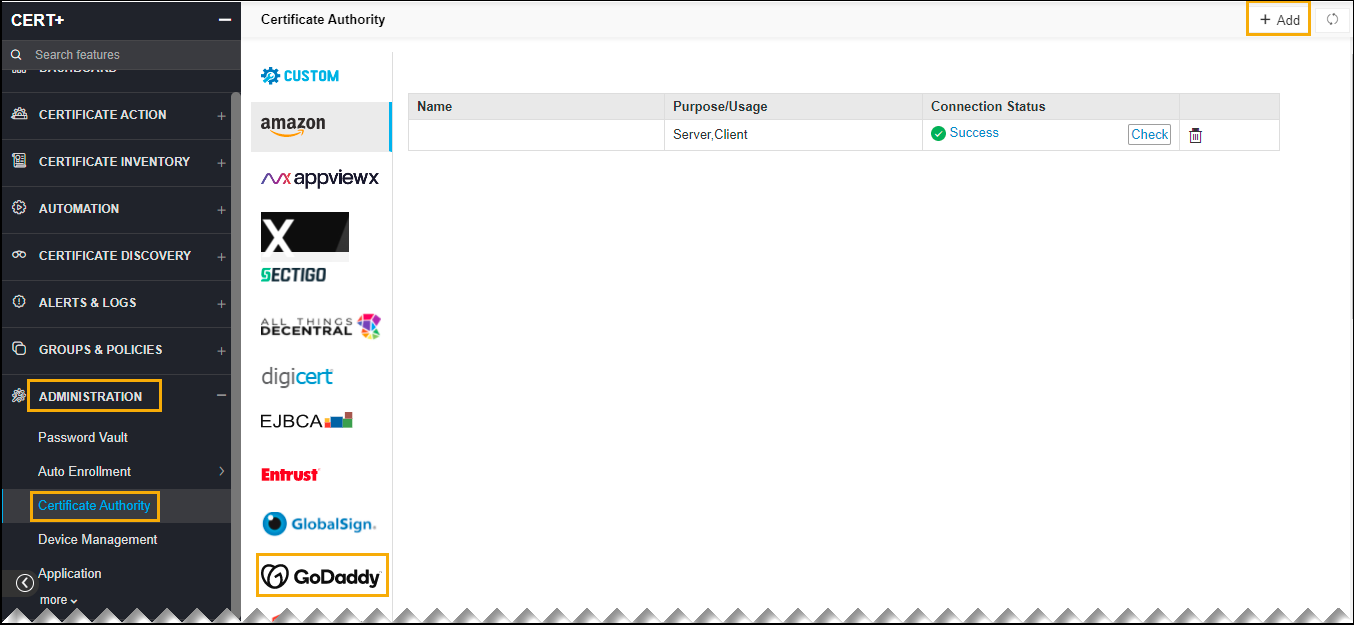
Click CERT+.
The CERT+ left navigation pane is displayed.
- Expand ADMINISTRATION.
-
Click Certificate Authority, and then select GoDaddy.
The Certificate Authority home page is displayed.
-
Click the +Add icon on the top right of the page.
The GoDaddy configuration page is displayed.
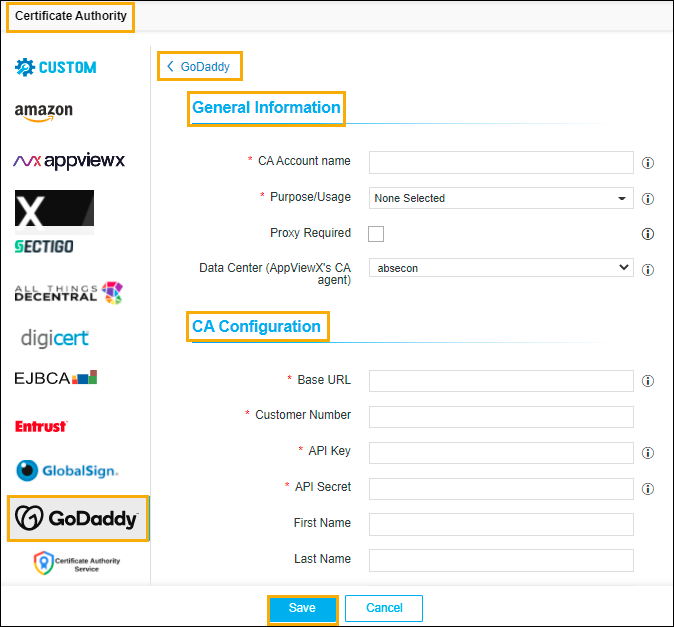
- Update the following details in the General Information section as described in
the table:
Table 1. General Information - Field Description Table Name Description *CA Account name A unique name to identify the CA setting. Note: No special characters other than ‘.’, ‘-’,’_’ are allowed. Names should not start with special characters. *Purpose/Usage Certificate Type for which CLM actions will be enabled. Example: Server, Client.
Proxy Required Enable this field if the CA communication needs to happen via Proxy. The proxy details configured in general settings will be used for communication. Data Center (AppViewX's CA agent) Select the data center through which the CA communication needs to happen. Note: The asterisk (*) symbol indicates a mandatory field. - Update the following details in the CA Configuration section as described in the
table.These fields are necessary for invoking the GoDaddy CA APIs for Certificate
Management.
Table 2. CA Configuration - Field Description Table Name Description *Base URL This URL will contain the Base URL of the GoDaddy CA API instance. For example: https://api.godaddy.com
*Customer Number Each user will have a unique customer number which is used to obtain the certificates from the GoDaddy CA account. *API Key API key generated in the GoDaddy portal which is used for GoDaddy API communications. *API Secret API Secret generated in the GoDaddy portal which is used for GoDaddy API communications. First Name First name of the GoDaddy Account user’s name as provided in the portal to be used for certificate creation purposes. Last Name Last name of the GoDaddy Account user’s name as provided in the portal to be used for certificate creation purposes. Email Address Email Id of the GoDaddy Account user’s name as provided in the portal to be used for certificate creation purposes. Note: Valid email address.
Phone Number Phone number of the GoDaddy Account user as provided in the portal to be used for certificate creation purposes. Note: Phone numbers must contain a minimum of 7 and a maximum of 15 numeric values.
Note: The asterisk (*) symbol indicates a mandatory field.