Certificate Alerts
Certificate Alerts helps you with alerts that are related to certificates. You can configure these alerts based on certificate events such as sync, validation, or expiry. Any certificate-related actions performed in your application are captured as logs. Also, you can notify users of a specific certificate action through these alerts.
To verify certificate alerts,
- Log in to AppViewX application with valid credentials.
-
Click the menu button located in the upper left corner of the screen.
The left navigation pane appears.
-
Click CERT+.
The CERT+ left navigation pane appears.
- Expand ALERTS & LOGS.
-
Click Alerts, and then select Certificate Alerts.
The Certificate Alerts screen appears.
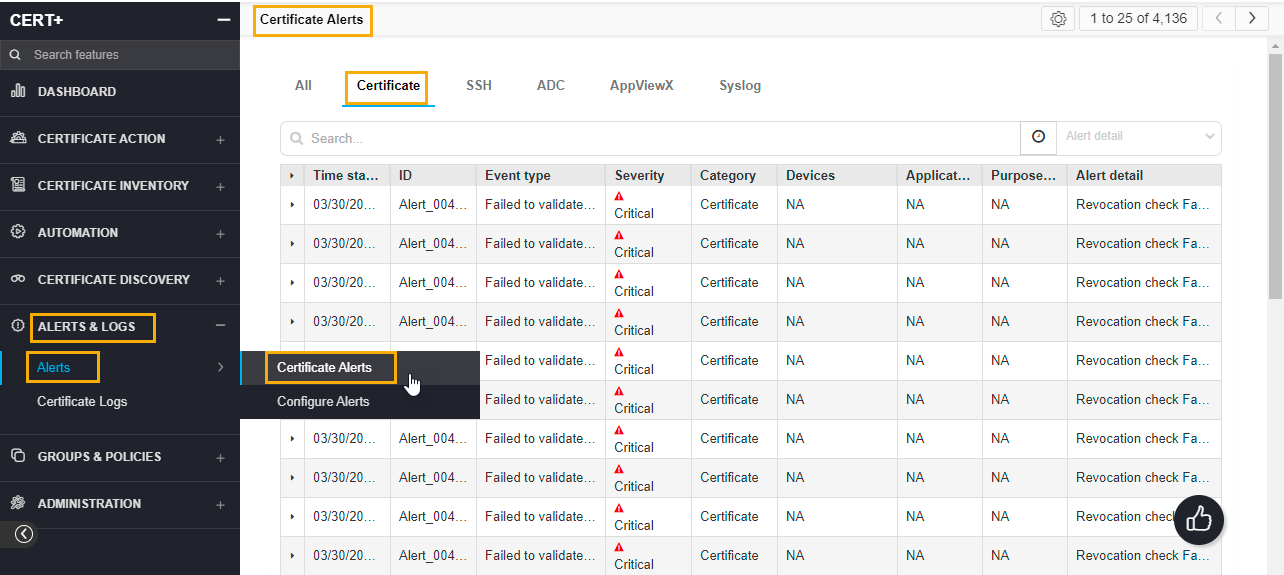
- On the Certificate Alerts list view page, you can find the list of alerts related to the certificates. Any actions performed on the certificates are captured under this list view.
- You can search for alerts based on the Alert ID, Alert Event type, Severity, Category, Devices, Applications, and Alert detail.
- On the alert screen, view all details for a log by hovering your cursor over each column of data or click the (Expand) icon for the log you want to view. The table row expands to display all details for the log.