Trust Store
-
Intermediate
-
Root
| Options | Description |
|---|---|
| Advanced Search | Allows you to perform a quick search for specific data. Clicking on the search bar dropdown opens the Advanced Search window. |
| All | Allows you to filter the certificates by their Certificate Authority (CA). |
| Actions |
Displays the list of actions you can perform on the certificates:
|
| Columns |
Allows you to select the columns to be displayed on the Client Certificate inventory page. |
| Number of Rows per Page | hover the mouse over the number of row displayed on the page, the
Show popup opens and choose the no. of rows to be displayed on the
page.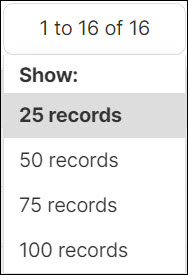 |
 |
Allows to switch between the certificate inventory pages. |
 |
Allows to refresh the certificate inventory data. |
Intermediate
Intermediate certificate inventory is where the issuer certificates apart from the root certificate will be displayed. In the chain of trust, if there is more than one layer of the intermediate certificate (excluding root and end certificate), all those certificates will be shown in this inventory.
Root
Root certificate inventory is where the root certificate of all the issuer certificates will be maintained. For any chain of trust certificates, there can be only one root certificate