Upload and sign
The Upload and Sign page enables users to upload a file for digital signing. On this page, users can choose from a selection of signing policies and the associated certificate keys to sign their uploaded files. Some signing policies may include specific meta-information configurations, ensuring that the signed files adhere to predefined policy requirements.
To Upload and Sign a file using Code Signing Certificate, follow these steps:
- Go to
 (Menu) > SIGN+ > SIGNING > Upload & Sign.
 The Upload and Sign page is displayed.
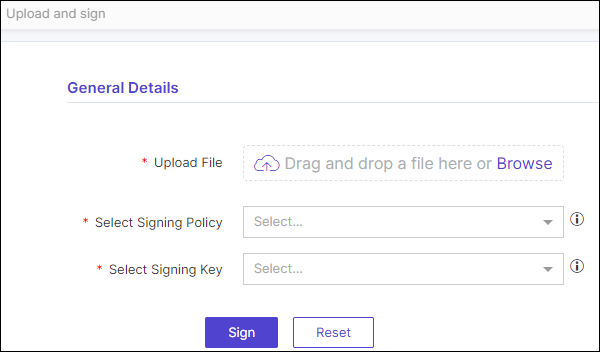
- Enter the required details, under General Details section.
- Upload File: To initiate the process, start by uploading the file you wish to sign.
- Select Signing Policy: Select the suitable signing policy according to your specific needs, considering any configurations applied during the signing policy's creation.
- Select Signing Key: Select the signing key that corresponds to the policy selected in the previous step.
- For specific policies, you may need to provide additional information. Kindly enter these details as configured in the selected signing policy.
- Click Sign to initiate the signing process.
- After the signing process is complete, the file will appear in the Signing Inventory, where you can proceed to download it.