Validating the Target Machine
-
On the AppViewX CertPlus Compatibility Checker screen:
-
From the following choices, select one or more options as
required:

Table 2. Descriptions of the options Option Description Agent To install the AppViewX Windows Gateway in the target machine, select this option. This will validate the prerequisites required for the installation. The machine name will be entered in the Machine Name field.
Certificate Authority To validate the Certificate Authority-related functionality, select this option. The CA Name is mandatory only in this case. Use the certutil -dumpcommand in a cmd window to get the CA Name. In the output, the value for Server is the Machine Name and the value for Name is the CA Name.In the sample screenshot shown below, the machine name is AVXENTSUB02.avxdevlab.net and the CA Name is avxdevlab-AVXENTSUB02-CA.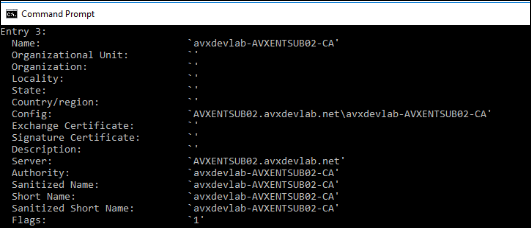
IIS To validate the IIS-sites related functionality, select this option. Key Store To validate only the Microsoft Certificate-store related functionality, select this option.
-
From the following choices, select one or more options as
required:
-
Click Submit.
Note: Mandatory fields (from Machine Name, CA Name, UserName, and Password) that have been missed will be highlighted in red after you click Submit.The validation summary is displayed in the text box below the Basic Information section, as shown in the image below:
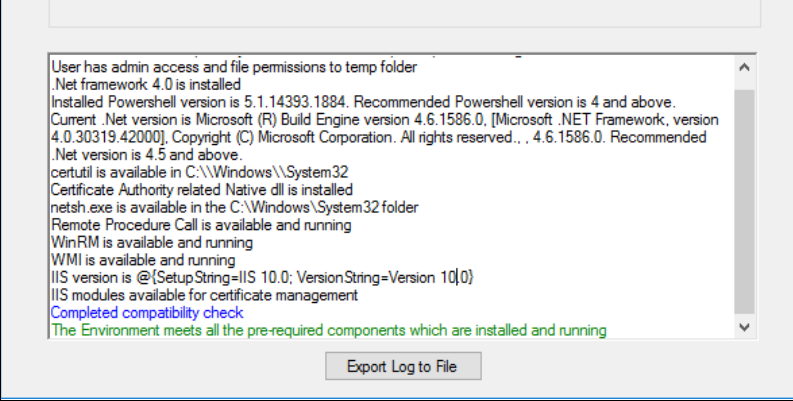
Table 3. Color coding followed in the validation summary Color Indicates Black Success information and output Red An error or warning Blue Completion of the validation process Green Successful completion of the process -
To export the validation summary as a log file, click Export Log to
File.
Following are the validations performed by the AppViewX Windows Troubleshooting tool:
Table 4. Validations performed by the AppViewX Windows Troubleshooting tool Validate Description Agent CA IIS Keystore User The validator will connect to the target machine with the username and password specified, and check if the target machine has admin access. Yes Yes Yes Yes .Net framework The validator will check if .Net framework version 4.5.2+ is installed. It will also display the current version installed. Yes Yes Yes Yes PowerShell The validator will check if PowerShell is installed. It will also display the current version of PowerShell installed. Yes Yes Yes Yes CertUtil The validator will check if the certutil component is available. The certutil component is used to retrieve the CA name and the corresponding templates. Yes Yes No No Certadm.dll The validator will check if this component, a native component to access the CA, is available in the C:\Windows\System32 folder. Sometimes, while trying to access this component during verification, it will return an error. Therefore, a manual check must be performed. Yes Yes No No netsh.exe This is used to bind the certificate to the installed agent port (8999). Yes No No No RPC The validator will check if the Remote Procedure Call (RPC) service is installed and running on the target machine. This service should be running to perform all remote operations.
Yes Yes Yes Yes WinRM The validator will check if the Windows Remote Management service is installed and running on the target machine. This service is required for the PowerShell execution.
Yes Yes Yes Yes WMI The validator will check if the Windows Management Instrumentation service is installed and running on the target machine. This service is required for the WMI and PowerShell execution.
Yes Yes Yes Yes IIS The validator will check if the IIS server is installed and, if yes, the current IIS version. No No Yes No