Configuring the Bamboo Pipeline Environment
-
Create or Open a Bamboo Plan:
- Login to the Bamboo instance and create a new plan or open an existing one where the code signing has to be integrated.
-
Add a Script Task:
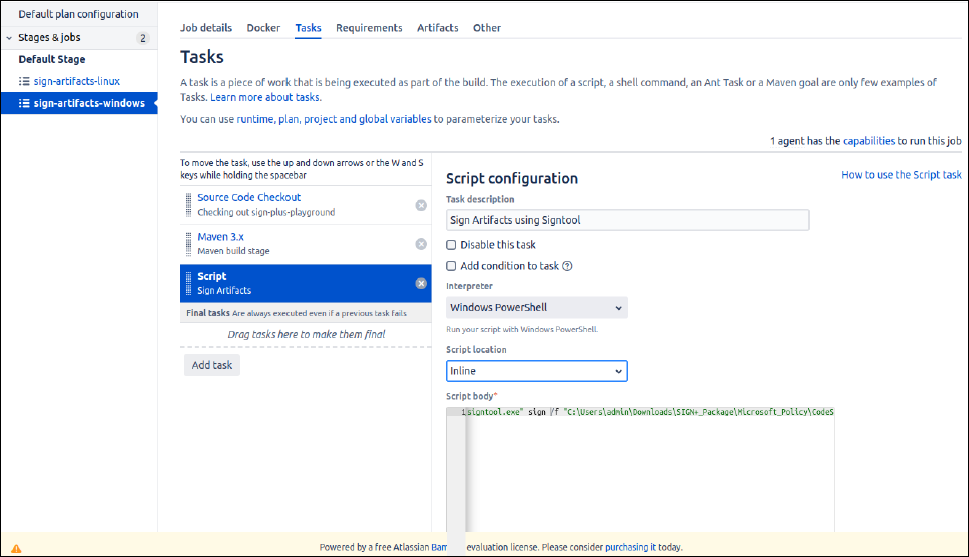
- Within the Bamboo plan, add a new Script task to one of the existing jobs or create a new job for this purpose. This task will run the jarsigner command.
- Set the interpreter to "Windows PowerShell" if using a Windows agent or set the interpreter to "Shell" if using a Linux agent.
-
Configure the Script Task for Integration with AppViewX
CSP/PKCS#11:
In the Script Body section of the Script task configuration, add the required commands to sign the artifacts based on requirement.
-
Save and Execute:
- Save the Script task configuration.
- Trigger a Bamboo build for the plan or setup webhooks to trigger the task based on code commit or any other events based on configuration.
Prerequisites
- The pipeline should be configured with the required Build stages and the required artifacts should be ready for signing.
- Copied the downloaded SIGN+_Package to the configured runner machine or agent and installed the package.
- Ensure the connectivity from the runner machine to the SIGN+ API Connector URL Node (Compute Cluster, Cloud Connector, LoadBalancer or OnPrem Worker Node).
Sample Script Configuration using AppViewX CSP and Signtool in Bamboo Dashboard
Using Signtool with AppViewX CSP
- Execute the AppViewX SIGN+ Installer executable in the configured runner machine to install the prerequisites required to use the AppViewX CSP/PKCS11 Providers.
-
Copy the
signtoolcommand generated in the README File after installation and update the Script Section with the generated command.signtool.exe sign /f <path to certificate> /fd <digest algorithm> /csp <csp_name> /k <key_alias_name> /tr <timestamp_url> /td <timestamp digest algorithm> <input_file_path>- /f <path to certificate>: Path to your code-signing certificate.
- /fd <digest algorithm>: Specifies the hashing algorithm.
- /csp <csp_name>: Name of Cryptographic Service Provider (CSP).
- /k <key_alias_name>: Key Container Name.
- /tr <timestamp_url>: Provides a timestamp from a trusted timestamping authority.
- /tr <timestamp_digest>: Specifies the timestamping Digest algorithm.
- <input_file_path>: Path to the file to be signed.
Using JarSigner with AppViewX CSP
- Execute the AppViewX SIGN+ Installer executable in the configured runner machine to install the prerequisites required to use the AppViewX CSP/PKCS11 Providers.
-
Copy the
Jarsignercommand generated in the README File and update the Script Section with the generated command.
The <time_stamp_url>, <signature algorithm> and <keypair alias> parameters are auto generated in the README after running the SIGN+ Installer.jarsigner.exe -verbose -storetype "Windows-My" -keyStore NONE -tsa <time_stamp_url> <input_file_path> -signedjar <output_file_path> -sigalg <signature algorithm> <keypair alias>
Using Nuget with AppViewX CSP
- Execute the AppViewX SIGN+ Installer executable in the configured runner machine to install the prerequisites required to use the AppViewX CSP/PKCS11 Providers.
-
Copy the
nugetcommand generated in the README File and update the Script Section with the generated command.
The <time_stamp_url>, <certificate_fingerprint> and <hashing_algorithm> parameters are auto generated in the README after running the SIGN+ Installer.nuget.exe sign <input_file_path> -Timestamper <timestamp_url> -CertificateFingerprint <certificate_fingerprint> -HashAlgorithm <hashing_algorithm> -Verbosity detailed -Overwrite
Using JarSigner with AppViewX PKCS#11 Provider
- Execute the AppViewX SIGN+ Installer executable in the configured runner machine to install the prerequisites required to use the AppViewX CSP/PKCS11 Providers.
-
Copy the
Jarsignercommand generated in the README File and update the Script Section with the generated command.
The <path to AVXPKCS11V1.cfg>, <time_stamp_url>, <signature algorithm> and <keypair alias> parameters are auto generated in the README after running the SIGN+ Installer.jarsigner -verbose -keystore NONE -storetype PKCS11 -certs -providerclass sun.security.pkcs11.SunPKCS11 -providerArg <path to AVXPKCS11V1.cfg> <input_file_path> -signedjar <output_file_path> -tsa <time_stamp_url> -sigalg <signature algorithm> <keypairalias>
Using JSign with AppViewX PKCS#11 Provider
- Execute the AppViewX SIGN+ Installer executable in the configured runner machine to install the prerequisites required to use the AppViewX CSP/PKCS11 Providers.
-
Copy the
JSigncommand generated in the README File and update the Script Section with the generated command.
The <path to AVXPKCS11V1.cfg>, <keypair alias>, <digest algorithm>, <timestamp url> parameters are auto generated based on the signing policy configurations in the README after running the SIGN+ Installer.java -jar <path_to_jsign_jar> --keystore <path to AVXPKCS11V1.cfg> --storetype PKCS11 --storepass 12345678 --alias <keypair alias> --alg <digest algorithm> --tsaurl <timestamp url> <input_file_path>
Using APKSigner with AppViewX PKCS#11 Provider
- Execute the AppViewX SIGN+ Installer executable in the configured runner machine to install the prerequisites required to use the AppViewX CSP/PKCS11 Providers.
-
Copy the
APKSignercommand generated in the README File and update the Script Section with the generated command.
The <path to AVXPKCS11V1.cfg>, <keypair alias> parameters are auto generated based on the signing policy configurations in the README after running the SIGN+ Installer.java -jar <path_to_apk_signer_jar> sign --provider-class sun.security.pkcs11.SunPKCS11 --provider-arg <path to AVXPKCS11V1.cfg> --ks NONE --ks-type PKCS11 --ks-pass pass:12345678 --ks-key-alias <keypair alias> --in "<input_file_path>" --out "<output_file_path>" --v1-signing-enabled false --v2-signing-enabled false --v3-signing-enabled true --v4-signing-enabled falseNote: The script can be configured to sign with any tool using the commands generated in the README File based on requirement.