Reports
Risk Report
The Risk Report provides information about risks and overall visibility of cumulative results of successful discoveries of hosts performed within the SSH+ product.
You can identify and remediate weak, shared, suspicious, and orphan host/user keys from the dashboard to keep the infrastructure secure. To perform remediation actions, see Remediation Actions. For description of keys, see Glossary.
Key Age Reports
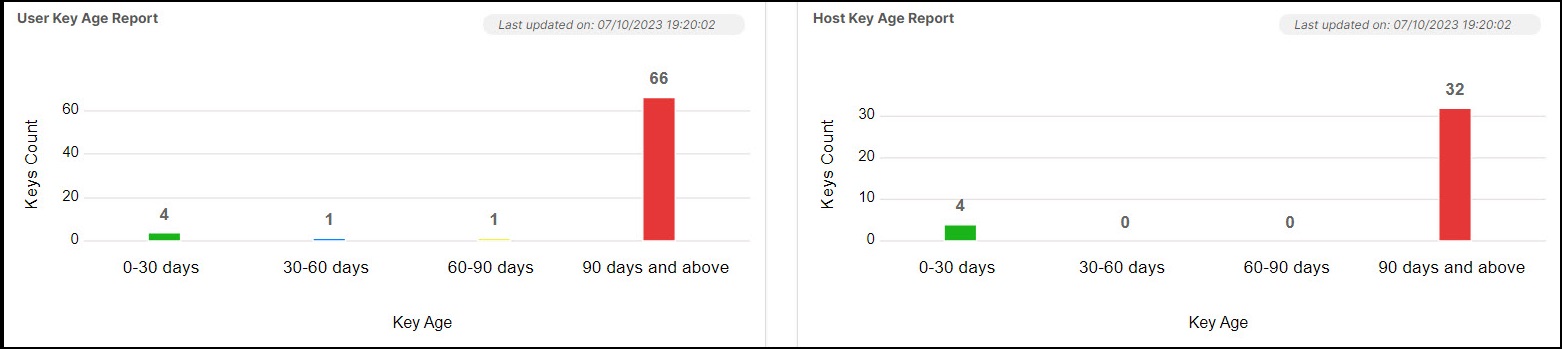
- User Key Age Report: A bar chart displaying the groupwise number of keys
(Y-axis) based on the following user key age (X-axis):
- 0 to 30 days
- 30 to 60 days
- 60 to 90 days
- 90 days and above
- Host Key Age Report: A bar chart displaying the groupwise number of keys
(Y-axis) based on the following host key age (X-axis):
- 0 to 30 days
- 30 to 60 days
- 60 to 90 days
- 90 days and above
Click the graph on the widget to fetch details of the client endpoints, host endpoints, associated users, key name, and the group.
You can also rotate and delete keys from hosts with multiple keys through the user and host key age report thus mitigating service disruptions. On selecting keys for rotation or deletion from an endpoint, a confirmation message appears. On confirming, the operation is triggered via workflow. To check the status and reports, go to Automation > Service Request and select your request from All requests.
Key Algorithm Bit Length Reports
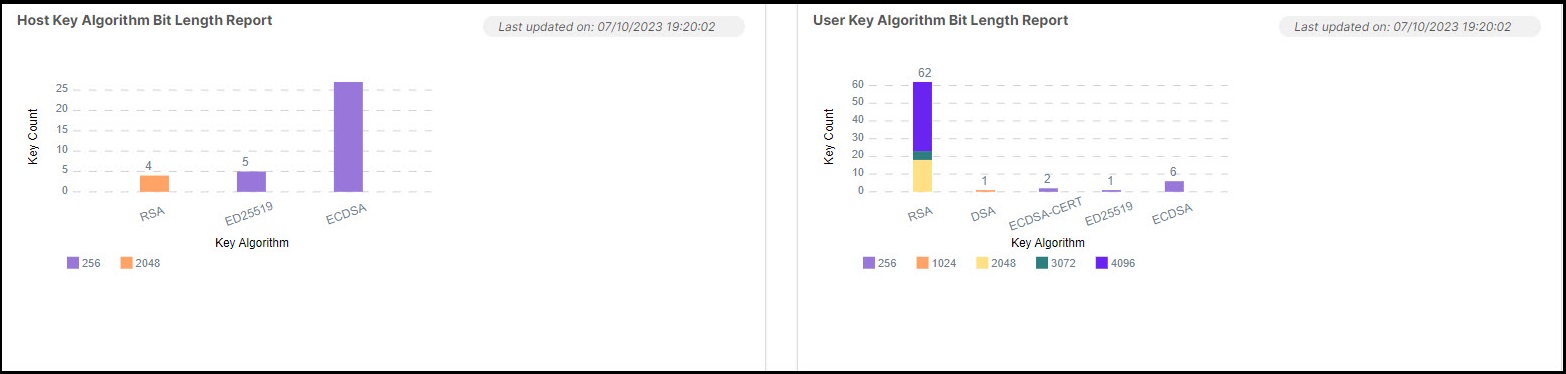
- User Key Algorithm Bit Length Report: A stacked bar chart displaying the groupwise number of key size (Y-axis) based on the user key size and algorithm (X-axis). The user key sizes are 256, 384, 521, 1024, 2048, 3072, 4096 while the key algorithms are RSA, DSA, RSA1, ED25519, ECDSA.
- Host Key Algorithm Bit Length Report: A stacked bar chart displaying the groupwise number of key size (Y-axis) based on the host key size and algorithm (X-axis). The host key sizes are 256 and 2048 while the key algorithms are RSA, ED25519, ECDSA.
Shared Key Report
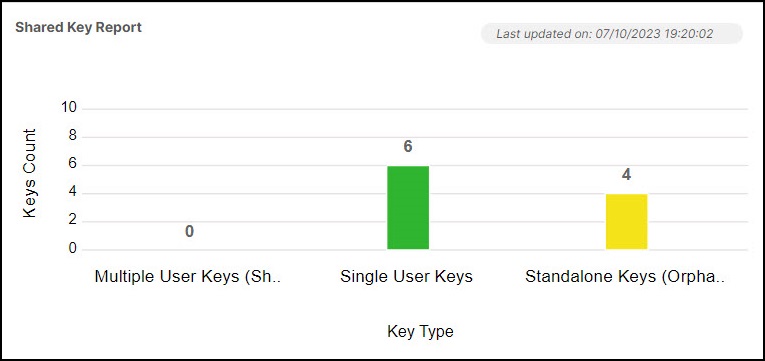
- Multiple User Keys (Shared): The number keys that are associated with multiple users and in the key group.
- Single User Keys: The number keys that are associated with a single user and in the key group.
- Standalone Keys (Orphan): The number of keys on standalone machines associated with the key group.
Click the graph on the widget to fetch details of the client endpoints, host endpoints, associated users, key name, and the host group.
Server-Side Reports

- Cipher suite report: This report provides the following numerical representation of All Cipher, High Cipher, Low Cipher, and Medium Cipher for the hosts added in the SSH host inventory.
- KEX report: This report provides the following numerical representation of All Algorithm, High Algorithm, Low Algorithm, and Medium Algorithm for the hosts added in the SSH host inventory.
- Mac report: This report provides the following numerical representation of All Algorithm, High Algorithm, Low Algorithm, and Medium Algorithm for the hosts added in the SSH host inventory.
Hover the mouse over the numbers and click it to fetch details of the host name, IP address/FQDN, algorithm, OS type, version, and group.
Client-Side Reports

- Cipher suite report: This report provides the following numerical representation of All Cipher, High Cipher, Low Cipher, and Medium Cipher for the hosts added in the SSH host inventory.
- KEX report: This report provides the following numerical representation of All Algorithm, High Algorithm, Low Algorithm, and Medium Algorithm for the hosts added in the SSH host inventory.
- Mac report: This report provides the following numerical representation of All Algorithm, High Algorithm, Low Algorithm, and Medium Algorithm for the hosts added in the SSH host inventory.
Hover the mouse over the numbers and click it to fetch details of the host name, IP address/FQDN, algorithm, OS type, version, and host group.
Host Certificate Expiry Report
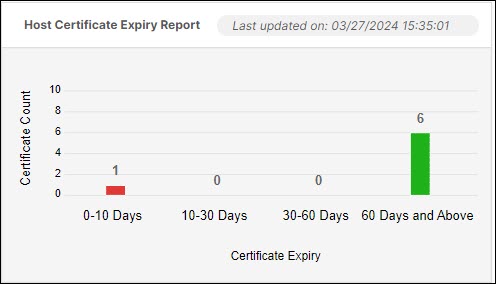
- 0 to 10 days
- 10 to 30 days
- 30 to 60 days
- 60 days and above
Actions
- Click Export to export the details to .csv or .xls format.
- Click View in Inventory to view the inventory listing of the categories on that page.