Search Request
This API searches the request collections and returns a response based on the specified criteria.
Before you begin
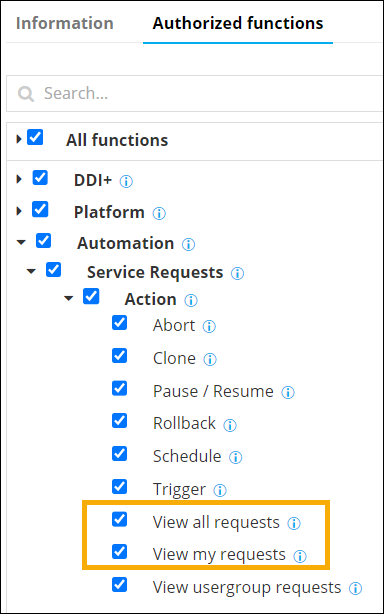
- Service Requests > Action > View all requests
- Service Requests > Action > View my requests
- Automation > Service Requests > Action > Trigger.
Request Structure
| Endpoint: | /visualworkflow-search-data |
| Type: | POST |
| Sample URL: | https://<IP/HostName/TenantName>:<GWPORT>/avxapi/visualworkflow-search-request?gwsource=externalTo understand the elements of the sample URL, click here. |
| Headers: | |
| Content-Type: | application/json |
| Name | Description |
|---|---|
| sessionID
|
(Mandatory) Use session ID retrieved from login
API is required if username and password are not
provided. Example: "sessionId": "ce7f1a14-2bf9-4e4a-89a8-bc780a255813" |
| username
|
(Mandatory) AppViewX login username is required if
sessionId is not provided. Example: "admin" |
| password
|
(Mandatory) AppViewX login password is required if
sessionId is not provided.. Example: "AppViewX@123" |
| Content-Type
|
(Mandatory) The parameter should be set to
application/json to specify the nature of
the data in the payload. Example: "application/json" |
| gwsource
|
(Mandatory) Source from which the request is
triggered. The values can be:
Type: String |
| pageIndex | Page index to fetch the data. Page index should be number. If the unavailable page index is provided then the first page will be returned. This field is required if the searchAll is true. Type: Integer |
| pageSize | Page size to be returned. Page size
should be number.
Type: Integer |
| searchAll | Search all the request with search criteria. The search all values - true, false. The default value will be false Type: Boolean |
| *query | |
| *key | Enter the required key value. The key should
always be workflowName. For example, “workflowName”:”Sample Workflow” Type: String |
| *value | Enter the name of the workflow. For
example, “workflowName”:”Sample Workflow” Type: String |
| *fieldCriteria | |
| *key | The key used for search. |
| *value | The values to be searched. |
| condition | If required enter the condition that needs to be
used for search criteria. The condition values: ==, !=, contains, <, >. The default value will be equals |
| responseMap | |
| custom | The custom response to be returned. For
example, |
Sample Request/Response
Use CaseSearches the request collections and returns a response based on the specified criteria.
https://<IP/HostName/TenantName>:<GWPORT>/avxapi/visualworkflow-search-request?gwsource=external{
"payload": {
"pageIndex":0,
"query": {
"criteria":[{"key":"workflowName","value":"Certificate Expiry Report"}]
},
"fieldCriteria": {
"criteria":[{"key":"value","value":"Certificate Expiry Report"}]
},
"customResponse":{"MyWorkorder":"workorderId"}
}
}{
"response": {
"pageCount": 1,
"result": [
{
"MyWorkorder": "0",
"requestId": "2",
"message": "Failed",
"status": 2
}
]
},
"message": null,
"appStatusCode": null,
"tags": null,
"headers": null
}Response Structure
Response returns string of type application/json with the following body parameters:
- Status Code: 200 OK
- Message: Success
- Headers:
- Content-Type: application/json
| Name | Description |
|---|---|
| requestID
|
Contains the response params for the search object request. |
| workorderId
|
The workoderId for the request. |
| message
|
Status of the request. |
| status
|
Status code of the request. |
Status Codes
| HTTP Code | appStatusCode | Message and Remediation |
|---|---|---|
| 200 OK | NA | Success |
| 400 Bad request | visualworkflow-search-engine-004 | Invalid/Incorrect payload. Possible
Remediation: Check and ensure if a valid value is given
in request payload field - input. Note: Query is mandatory. |
| 400 Bad request | visualworkflow-search-engine-005 | Invalid/Incorrect payload. Possible Remediation: Check and ensure if a valid value is given in request payload field - input. Note: Field criteria is mandatory. |
| 400 Bad request | visualworkflow-search-engine-006 | Invalid/Incorrect payload. Possible Remediation: Check and ensure if a valid value is given in request payload field - input. Note: Unsupported operator. |
| 500 Internal Server Error | visualworkflow-search-engine-001 | Invalid form data. Provide all mandatory
data. Possible Remediation: Check and ensure if a valid value is given in request payload field - input. Request collection search data retrieval process failed. |
| 500 Internal Server Error | visualworkflow-search-engine-002 | Invalid form data. Provide all mandatory
data. Possible Remediation: Check and ensure if a valid value is given in request payload field - input. Input Output collection search data retrieval process failed. |
| 500 Internal Server Error | visualworkflow-search-engine-003 | Invalid form data. Provide all mandatory
data. Possible Remediation: Check and ensure if a valid value is given in request payload field - input. Global data collection search data retrieval process failed. |
Reference
- IP/HostName/TenantName: Replace with the actual IP address, hostname,
or tenant name based on the specific configuration in AppViewX.
- IP: A unique identifier assigned to each device connected to
a computer network that uses the Internet Protocol for communication
The IP address will be included in the endpoint URL for an on-prem deployment.
- HostName: A human-readable label assigned to a device (host)
on a network
The hostname will be included in the endpoint URL for an on-prem deployment.
- TenantName: An identifier label for a tenant given to
indicate which tenant's data the API request will
access/modify
The tenant name will be included in the endpoint URL for a SaaS deployment.
- IP: A unique identifier assigned to each device connected to
a computer network that uses the Internet Protocol for communication
- GWPORT: AppViewX gateway port
A gateway port refers to a network port through which data is sent and received to communicate with a gateway in an on-prem deployment.
Example: 31443
- avxapi: Path parameter value (static) that is part of the endpoint's URL
- Endpoint: Endpoint of the API, for example: execute-hook
- gwsource: Source or origin of a gateway, for example: external.