Advanced Search
With the advanced search functionality, you can enable precise identification and management of keys. This not only enhances the platform's usability and security but also facilitates efficient key management process.
The SSH+ Key Inventory search supports more granular and flexible searches across various key attributes, including client endpoints, host endpoints, associated users, encryption types, key length, key name, group, file path, fingerprint, and comment.
-
Go to
 (Menu) icon > SSH+ > Inventory > Key Inventory.
-
Select User Key Inventory or Host Key Inventory.
The SSH+::User Key Inventory/Host Key Inventory page is displayed.
-
Click
 (Advanced Search) icon in the Search bar.
The Advanced Search window appears. By default, client endpoints, host endpoints, associated users, encryption types, key length, key name, file path, fingerprint, comment, and tags (entry mode and label) are selected. To add or remove or reposition the search attributes, click Configure Advance Search Attributes.
(Advanced Search) icon in the Search bar.
The Advanced Search window appears. By default, client endpoints, host endpoints, associated users, encryption types, key length, key name, file path, fingerprint, comment, and tags (entry mode and label) are selected. To add or remove or reposition the search attributes, click Configure Advance Search Attributes.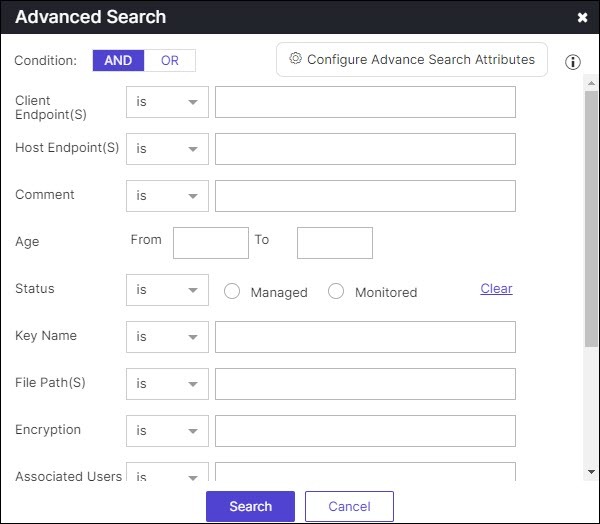
- Select the AND or OR condition. By default, AND is selected.
-
Select is, or is not, or contains from the dropdown list
of each field and specify the search value. By default, is is selected.
You can specify more than one search value using commas.
-
Click Search.
The search results are displayed.