ADC+ API Guide
This guide provides information on the APIs to use for managing, automating, orchestrating, and observability for application delivery services.
API Reference
This applies only to AppViewX customers. To try the AppViewX exposed APIs on Swagger,
follow these steps:
- From the top right corner of your screen, click
 (API Reference) icon.Note: The API Reference icon is displayed for the Admin user and users with ACF permission enabled for API Reference.
You will be redirected to AppViewX API Reference page.
- Click the required API to Try it out.
Enable ACF Permission for API Reference
To enable the ACF permission for non-admin roles to access the API reference, follow
these steps:
- Go to Platform module IDENTITY > Role > Authorized functions.
- In the Authorized functions section, expand the Platform, by
clicking the
 icon.
icon. - To assign API Reference, select the checkbox beside API
Reference.
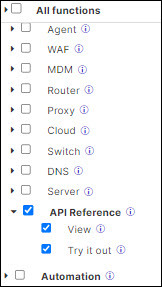
- Click Save.
Best Practices for Working with the AppViewX API
- Use appropriate HTTP methods.
Ensure that the correct HTTP method is used for each operation (e.g., GET for retrieval, POST for creation).
- Handle errors gracefully.
Implement proper error handling in your application to manage API responses.
- Use secure storage.
Store access tokens securely and avoid hardcoding them in your application code.
- Implement pagination.
For endpoints that return large datasets, implement pagination using limit and offset parameters.