Powershell
Overview
- In this mode, a powershell remoting session is created between the windows agent machine and the configured device. The powershell scripts are executed in session for different operations.
- This is the most modern and recommended mode of communication for performing different tasks.
- For more information on the pre-requisites for Powershell mode, refer
Recommended usage
- This is the recommended mode as it is the most modern and supports all the use cases without any specific restrictions.
- WinRM is a more modern protocol used by many organizations.
- Ports 5985 are used in WinRM and WinRM v2.
- All WinRM data is encrypted using "Integrated Windows Authentication," preferably set to Kerberos authentication on the host machine.
- Essentially, WinRM is an HTTP-based API, and the data returned is in XML format rather than objects, as WinRM is XML-based.
- It is comparatively faster than WMI and Native Mode.
Permissions and Port Requirements
| Requirement | AppViewX Windows Gateway | Target Server |
|---|---|---|
| User account type | Service account with local admin | Service account with local admin |
| Services | RPC Service WinRM Service WinRM Configuration Powershell remoting certutil.exe command availability |
RPC Service WinRM Service WinRM Configuration Powershell remoting certutil.exe command availability |
| Ports | 8999 (Customisable) 5985 (HTTP) or 5986 (HTTPS) - WSMAN 445 - SMB (needed only in case of push functionality) |
5985 (HTTP) or 5986 (HTTPS) - WSMAN 445 - SMB (needed only in case of push functionality) |
Prerequsisites for Powershell Mode
To ensure successful management of Windows servers in PowerShell mode, the following prerequisites must be met:
Local Administrator Account on Target Machines
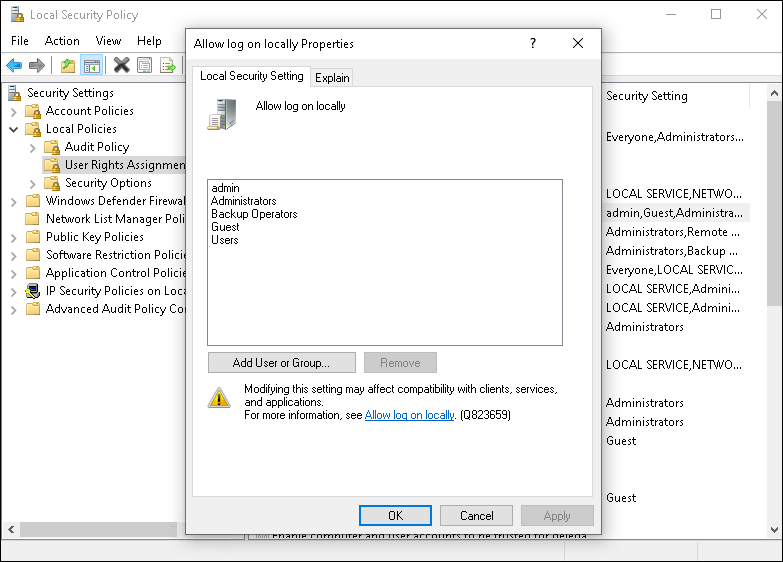
For more details, refer to the Microsoft documentation:about_Remote_Requirements - PowerShell | Microsoft Learn
Logon Service Account on the Windows Agent Machine
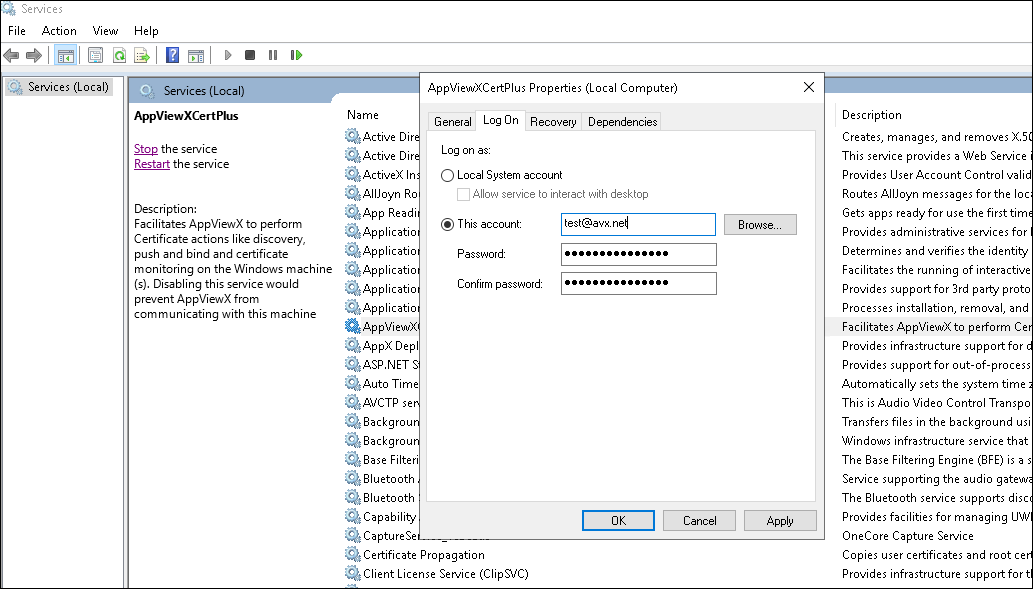
Network Ports
- Port 8999 (default): Open on the Windows agent machine for communication with the Cloud connector or AppViewX.
- Port 5985 (HTTP) or 5986 (HTTPS): Required for Windows Remote Management (WinRM) to enable remote PowerShell.
- Port 445 (SMB): Used for certificate file transfer during push/bind operations to a target server via SMB protocol.
Enable Remote Powershell in the Target Machines
winrm quickconfig
Kerberos Authentication
- Ensure all accounts involved are within the same domain to enable the use of the Kerberos authentication mechanism for remote PowerShell connections.
- Validate the Kerberos setup between the target machines and the Windows agent machine to ensure proper authentication and communication.
Justifying Admin Access
To create remote sessions and run remote commands, the current user must, by default, be a member of the Administrators group on the remote computer or provide administrator credentials. Otherwise, the command will fail.
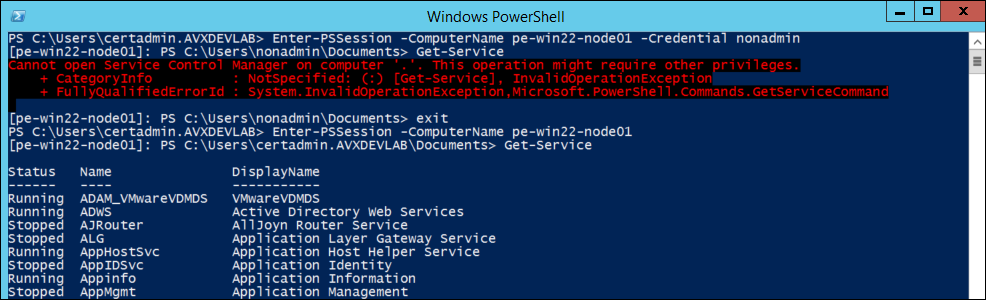

Certificate Store Access
- Admin Privileges for Certificate Management: Managing certificates in system-wide locations, such as the Local Machine certificate store, requires admin privileges. This includes tasks like installing, renewing, revoking, and deleting certificates.
- Service Configuration: Administrative access is necessary for configuring services to use specific system certificates for secure communication. This includes modifying service configurations, such as those for SQL Server.
- Private Key Management: Admin privileges are needed to manage private keys associated with certificates. This includes importing/exporting certificates with their private keys, configuring key access permissions, and configuring key archival and recovery policies.
- MS Certificate Authority (CA) Operations: Tasks related to managing a Certificate Authority (CA), such as configuring CA settings, issuing and revoking certificates, and managing certificate templates, often require admin privileges.
- System Integrity: Certificate management is crucial for system integrity and security. Admin privileges ensure that only authorized users can manage certificates, reducing the risk of unauthorized access, tampering, or misuse.
- Security: PowerShell remoting allows users to execute commands and scripts on remote computers. Admin access ensures that only users with sufficient privileges can perform potentially sensitive or impactful actions on remote systems.
- System Management: Many administrative tasks, such as IIS administration and accessing certain registry keys, require administrative privileges. PowerShell remoting enables administrators to perform these tasks remotely, but admin access is necessary to execute the required commands successfully.
- Resource Control: Admin access ensures that users have the necessary permissions to access and modify system resources, such as files, directories, and registry keys, on remote machines. This level of access is often required for effective system management and troubleshooting.
- Configuration Management: PowerShell remoting is commonly used in configuration management and automation scenarios. Administrators need admin access to deploy configurations, install updates, and perform other management tasks remotely.
To learn about the system and configuration requirements for running remote commands in PowerShell, refer to the "about Remote Requirements" section on the Microsoft documentation website.