Workflow Settings
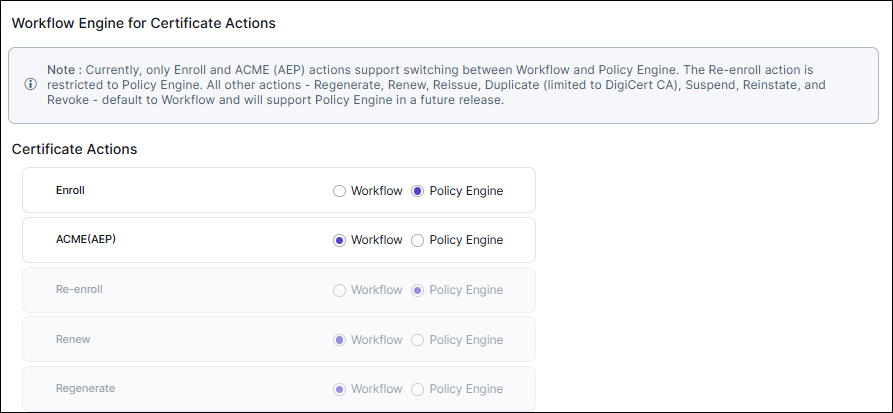
You can now choose between Workflow or Policy Engine to manage certificate actions. Currently, only the Enroll and ACME (AEP) actions support switching between Workflow and Policy Engine while the Re-enroll action is restricted to Policy Engine. All other actions - Regenerate, Renew, Reissue, Duplicate (limited to DigiCert CA), Suspend, Reinstate, and Revoke - default to Workflow.
To enable workflow settings:
-
Go to
 (Menu) icon > CERT+ > ADMINISTRATION > General Settings.
- Select Workflow Settings.
-
Select between Workflow and Policy Engine options.
 If you have enabled Policy Engine, then you can manage that action by going to
(Menu) icon > Policy Engine > POLICY MANAGEMENT > Policies and
selecting Managed Certificate Policy. For more information, see Enrolling Certificates from Policy Engine.
If you have enabled Policy Engine, then you can manage that action by going to
(Menu) icon > Policy Engine > POLICY MANAGEMENT > Policies and
selecting Managed Certificate Policy. For more information, see Enrolling Certificates from Policy Engine.