Compare Device Backups
-
Click
 and select Inventory > Backup & Restore.
The Backup & Restore screen opens.
and select Inventory > Backup & Restore.
The Backup & Restore screen opens. - In the Sub Systems column on the left, click ADC,Proxy,or Firewall, depending on the device types that you want to compare.
- Click the Compare tab.
- (Only applicable for ADC) On the Compare screen that opens, select the compare type: Device or Object.
- (Only applicablefor Proxy andFirewall) On the Compare screen that opens, the compare type is selected as Device by default.
- In the Device name field, enter the name of the first device whose backup you want to compare.
- In the Archive 1 field, select the first backup in the comparison.
- In the second Device name field, enter the name of the second device in the comparison. If you want to compare backups from the same device, enter the same name you entered in Step 4.
- In the Archive 2 field, select the second backup in the comparison.
-
Click Compare.
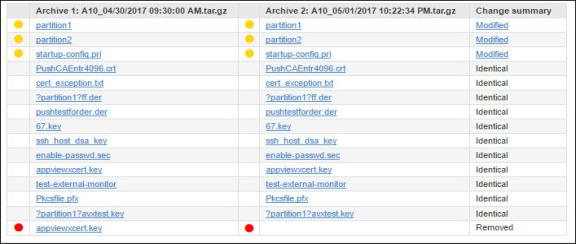
A table appears at the bottom of the screen, showing all of the files contained in the two backups you selected. Yellow circles appear beside each file that has been modified since the earlier backup was taken and red circles appear beside each file that has been removed since the earlier backup was taken.