Application/Device Alert
ADC specific Application/Device actions executed from AppViewX (Control Center or Dashboards) will be raised as an alert captured in the alerts inventory.
- Navigate to ADC alerts inventory by clicking Menu > ADC+ > ALERTS & LOGS > Alerts > ADC tab.
- All the successful and failure events are captured in the alerts inventory along with the user comments. This enabled an Admin to track end-user actions.
- Every alert contains the following information:
-
Alert ID
-
Alert Event type
-
Severity
-
Category
-
Devices
-
Applications
-
Alert Detail
-
- Search for any alert by the Application, Device name or message etc.,
- All Successful actions are tagged as Notification and Failure as Critical alerts respectively.
- Event type helps to identify the type of event - An action event or Restore event or Backup event etc.,
-
An example of Object Enable Alert:
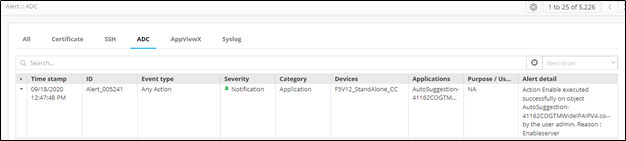
-
An example of Device status change alert (Managed to Unmananged):
