CRL Certificate Revocation Check
To download the CRL for all the certificates in the inventory and validate with the downloaded CRL record. You can change the revocation status in the inventory.
Check
- The cron job is executed to download CRL data for all the certificates available in the inventory.
- Once CRL is downloaded compare and change the revocation status in the inventory.
Monitor
The scheduled job is monitored and triggered by default daily every 6 hours.
Audit
The internal business logic for certificate revocation check is captured via audit logs and notification logs in the logging module.
CRL Download Monitor Job
To monitor the certificates in inventory and download the CRL for the newly added certificate. Make sure that the below actions are completed for the CRL download monitor job.
Check
The cron job is executed to monitor the certificates in inventory to download the CRL for the newly synchronized certificate.
Monitor
The scheduled job is monitored and triggered by default every 5 minutes.
Audit
The internal business logic for the certificate download monitor job is captured via audit logs and notification logs in the logging module.
Certificate Revoke Status Check From CA
For all the certificates managed or monitored in the inventory, this job will be performed periodically at the configured duration. Based on this check, the certificate status in the inventory will be updated with either revoked or others.
Check
The cron job is executed to check only the certificate revoke status from the CA Portal.
Monitor
The scheduled job is monitored and triggered by default every 15 minutes.
Audit
The internal business logic to check the certificate revoke status from the CA portal is captured via audit logs and notification logs in the logging module.
Auto-Regenerate Certificates
This job is triggered periodically to check whether the regeneration action to be triggered for the certificates in the inventory that are enabled with Regenerate Automatically in the CA connector, based on whether the certificate is reached the time to trigger the regenerate action.
Check
The cron job is executed for auto regeneration of certificates at a scheduled time.
Monitor
The scheduled job is monitored and triggered by default daily at 02:00:00 A.M.
Audit
The internal business logic of auto-regenerates certificates is captured via audit logs and notification logs in the logging module.
Delete Expired Certificates
This is a periodical job to check and delete the expired certificates available in the inventory. This job will be triggered only when this action is enabled in “Expired Certificates”.
Check
- Log in to AppViewX application with valid credentials.
-
Click the menu button located in the upper left corner of the screen.
The left navigation pane appears.
-
Click CERT+.
The CERT+ left navigation pane appears.
-
Expand ADMINISTRATION and then click more.
-
Click Expired Certificates.
The Expired Certificates page appears.
-
Enable Yes to delete the expired certificates.
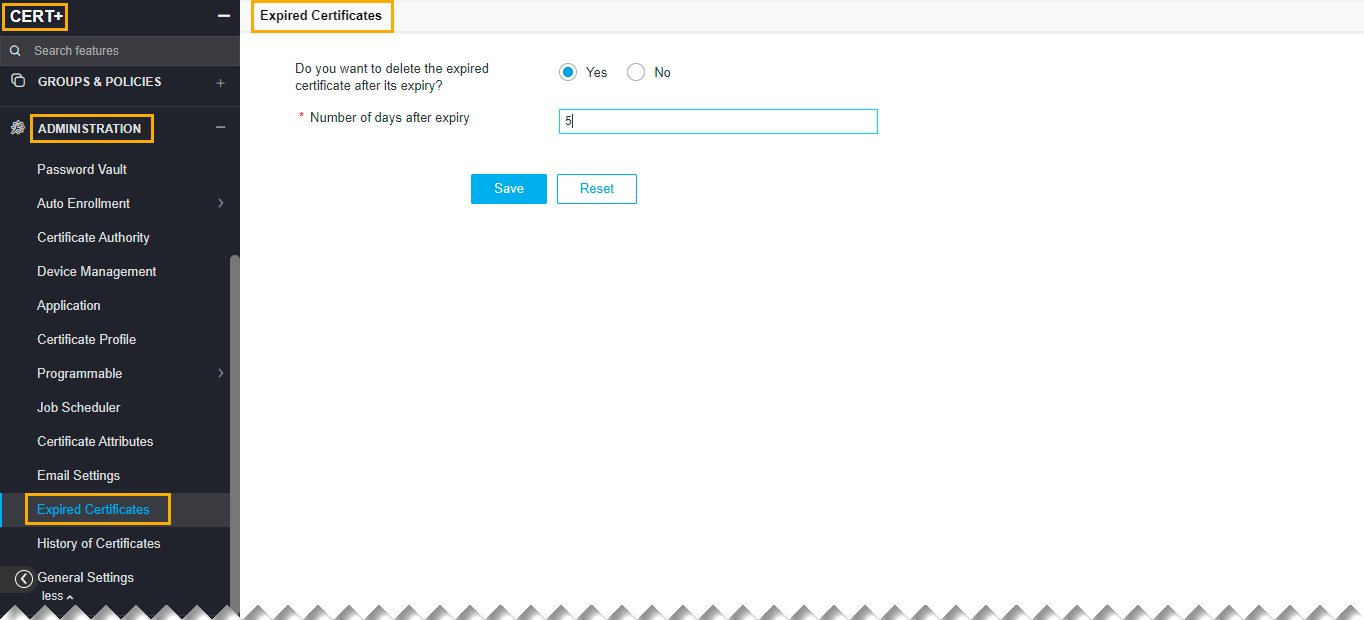 Note: Once enabled, automatically the expiry certificate will be deleted.
Monitor
The scheduled job is monitored and triggered by default daily at 03:00:00 A.M.
Audit
The internal business logic of auto regenerate certificates are captured via audit logs and notification logs in the logging module.
Auto-Renew Certificates
This job is triggered periodically to check whether the renewed action to be triggered for the certificates in the inventory that are enabled with Renew Automatically in the CA connector, based on a certificate is reached the time to trigger the renew action.
Check
To auto-renew certificates if it is scheduled.
Monitor
The scheduled job is monitored and triggered by default daily every 6 hours.
Audit
The internal business logic of auto-renew certificates is captured via audit logs and notification logs in the logging module.
Certificate Expiry Status Check
This job is triggered periodically to update the expiry status for all the certificates in the inventory.
Check
The cron job is executed to check the expiry status of all the certificates available in the inventory.
Monitor
The scheduled job is monitored and triggered by default daily 20 minutes every 5 hours.
Audit
The internal business logic to check the expiry status is captured via audit logs and notification logs in the logging module.
Periodic CRL Update for AppViewX and Custom CAs
To do the CRL rotation for AppViewX and Custom CA. The CRL is regenerated, any expired certificates are removed from the CRL.
Check
The cron job is executed to rotate CRL for AppViewX and Custom CA so that the CRL is regenerated, any expired certificates are removed from the CRL.
Monitor
The scheduled job is monitored and triggered by default daily at 05:00:00 A.M.
Audit
The internal business logic to update the CRL is captured through audit logs and notification logs in the logging module.
CA Connector Validity Updater
It allows to check the validity offered by CA and update the same in CA connector and policy.
Check
- The cron job is executed to check the validity offered by the External CA and update the same in CA connector and Certificate policy.
Monitor
- The scheduled job is monitored and triggered by default on every Sunday at 06:00:00 A.M.
Audit
- The internal business logic to update the CA connector and Policy is captured via audit logs and notification logs in the logging module.
Certificate Vulnerability Check
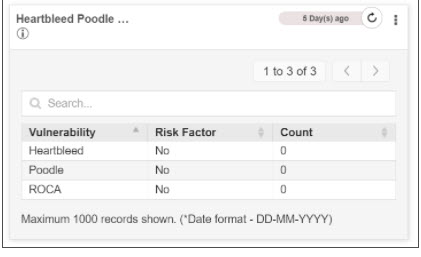
This is a periodical running job to update the vulnerability report data available in the dashboards Server endpoint security. It allows checking the vulnerability in the device such as Toodles, Heart bleed, and Roca.
- The cron job is executed to check the certificates and their device association
- There is internal business logic to check the Poodle, Heart bleed, and Roca vulnerabilities for the associated device.
- Once the job is completed the “Vulnerability reports” are updated in “Server_Endpoint_Security”, “Client_Endpoint_Security”.
- The ROCA vulnerability is a cryptographic weakness that allows the private key of a key pair to be recovered from the public key in keys generated by devices with the vulnerability.
- The Heartbleed Bug is a serious vulnerability in the popular OpenSSL cryptographic software library. This weakness allows stealing the information protected, under normal conditions, by the SSL/TLS encryption used to secure the Internet.
- The Poodle vulnerability lets an attacker eavesdrop on communication encrypted using SSLv3. The vulnerability is no longer present in the Transport Layer Security protocol (TLS), which is the successor to Secure Socket Layer (SSL).
Monitor
The scheduled job is monitored and triggered by default weekly, on Saturday.
Audit
Certificate CAA Record Check
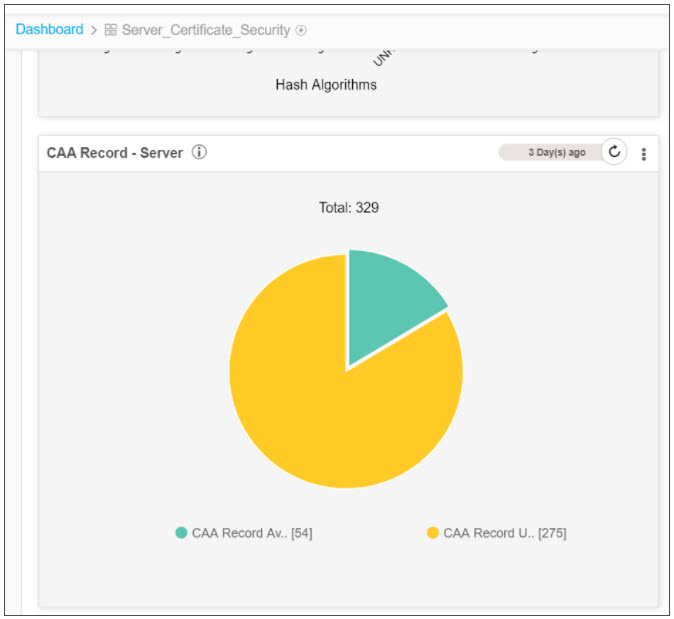
- The cron job is executed to check the CAA record for all the certificates in the inventory.
- Once the job is completed, the CAA report is updated in the server_certificate_security dashboard.
Monitor
The scheduled job is monitored and triggered by default weekly, on Monday.
Audit
The internal business logic to check the CAA records for all the certificates are captured through audit logs and notification logs in the logging module.
Certificate Transparency Check
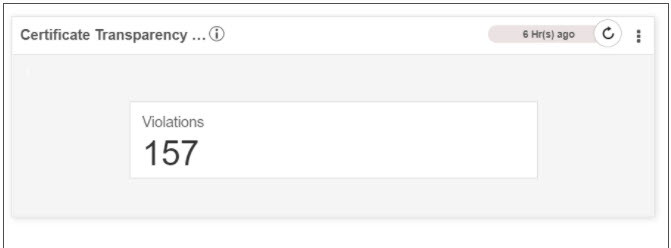
- The cron job is executed to check the Certificate transparency for all certificates in the inventory.
- The internal business logic uses the Google CT project (Open source) to identify the violation
- Once the job is completed, the CT and CAA reports are updated in the server_certificate_security dashboard.
Monitor
The scheduled job is monitored and triggered by default weekly, on Sunday.
Audit
The internal business logic to check the CT for all the certificates is captured via audit logs and notification logs in the logging module.
Certificate Validation Check
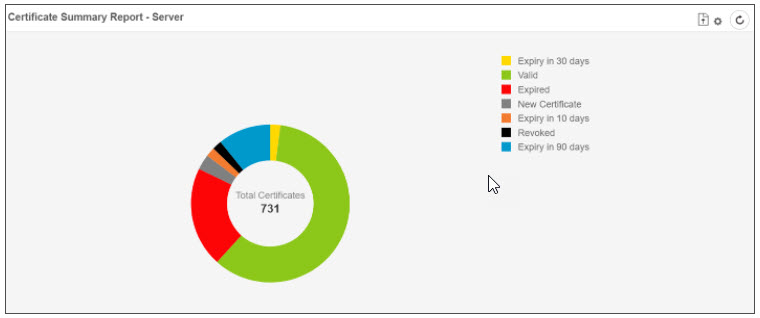
- The cron job is executed to check the validation for all certificates in the inventory.
- Once the job is completed, the certificate summary report is updated in the Server Certificate and Client Certificate Dashboard.
Monitor
The scheduled job is monitored and triggered by default weekly, on Monday.
Audit
The internal business logic to check the CT for all the certificates is captured through audit logs and notification logs in the logging module.