Process Explorer
Whenever the bulk renewal and CA migration operations get performed, in the process explorer window, the status of every certificate will be shown according to the operation done. The user is allowed to verify and modify the data from the process explorer as well.
To perform process explorer,
- Log in to AppViewX application with valid credentials.
- Click the menu button located in the upper left corner of the screen.
The left navigation pane appears.
- Click CERT+.
The CERT+ left navigation pane appears.
- Expand CERTIFICATE ACTION.
-
Select CA Switch, and then Process Explorer.
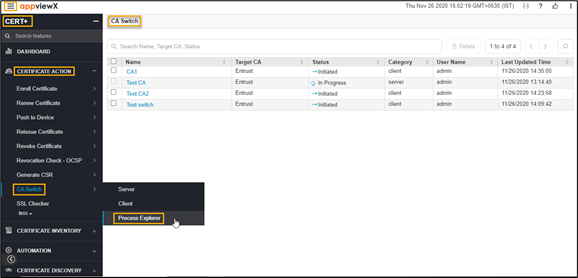 The Process Explorer page appears.