What is Windows Auto-Enrollment Proxy?
Windows Auto-Enrollment Proxy (WAEP) is a component developed by AppViewX that helps users/devices connected to the Microsoft domain to enroll or migrate their existing certificates automatically to AppViewX PKIaaS.
How WAEP works
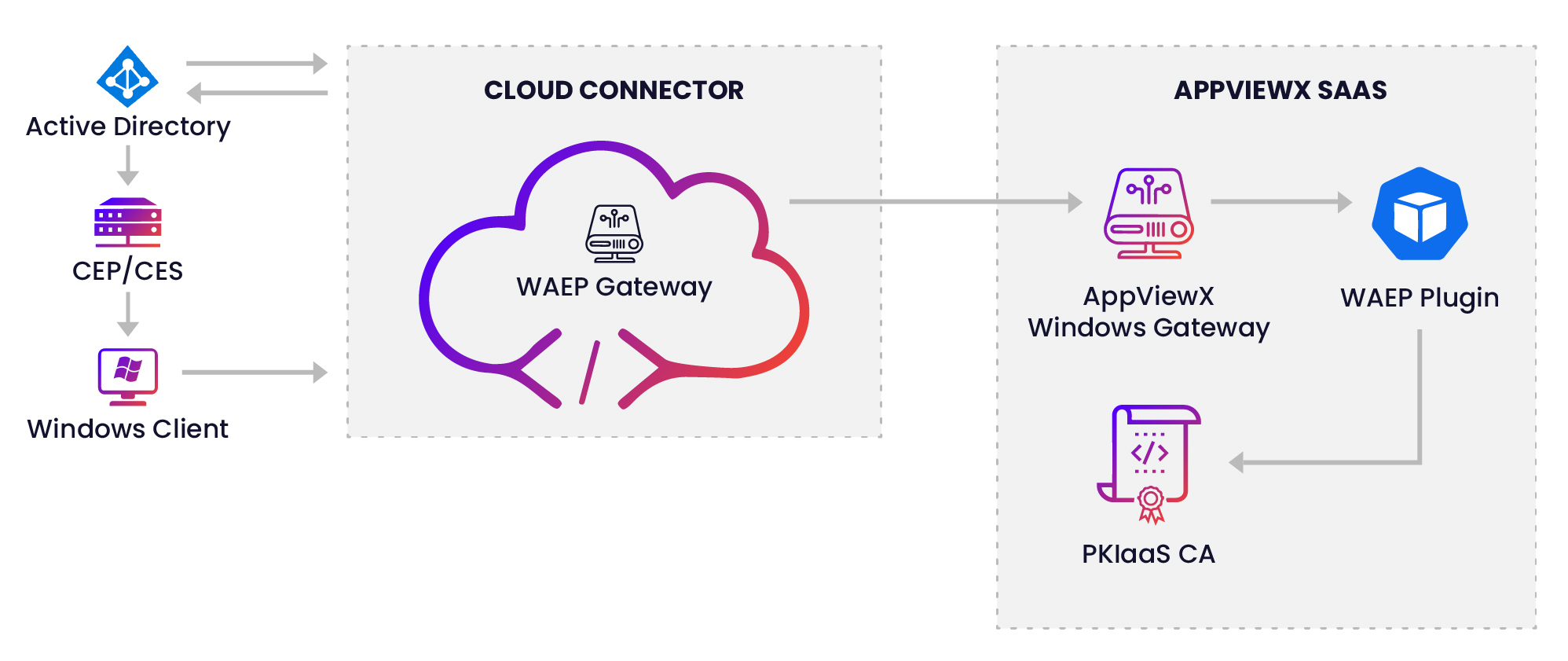
- The Certificate Enrollment Policy (CEP) server publishes the certificate template information, the CA information, and the enrollment link to all Windows clients and users.
- The Windows client sends the request directly to the Cloud Connector (CC) via Certificate Enrollment Web Service (CES) for enrolling a certificate.
- The CC queries for the agent settings along with other details such as AD configuration and global catalog server configuration. With the CC IP address and the port making a unique combination, there will be only one agent settings based on this combination of business keys.
- The WAEP module then fires an LDAP query using the agent settings fetched. It fetches the details from the global catalog servers and constructs the request.
- The CC then forwards the CSR payload to the PKIaaS for issuing a signed certificate.
- The signed response is then routed back to the client through the CC.
Prerequisites
- Configure Enrollment URL in the Active Directory (AD).
- Enrollment URL must point to the AppViewX CC server.
- Enrollment links must be published via group policy or local settings to all users, devices, DCs, and any other entity setup for auto-enrollment.
- Establish trust for all entities in the environment.
- Push the AppViewX Trust anchor certificates to all users and devices to the respective certificate stores.
- This must be pushed via AD Group policies or local settings.
- Set up TLS connection in the AppViewX CC server.
- Enable the ACME service during the setup of CC for WAEP to function.
- The AppViewX CC server must be configured with certificate TLS to handle connection between Windows clients and the CC server.
-
The AppViewX CC server must be made a domain member to use the Lift and Shift feature.
The CC ships with a self-signed certificate but ensure to replace the default self-signed certificate with a signed certificate. You can choose to have the signed certificate either from the AppViewX PKIaaS or a trusted third-party CA depending on your organizational policies.
If you choose to replace the default certificates with PKIaaS-issued certificates, ensure that the end clients have access to CDP points to download the CRL for validation.
-
The policies are pushed to all auto-enrollment entities via the CEP server.
-
The CES automatically initiates a certificate request for the end-clients and requests the WAEP server for a certificate.
Server Requirements
| Server/Client | Requirements |
|---|---|
| Microsoft Active Directory Domain Services Server |
Operating System:
Server Roles:
|
| AppViewX Auto-Enrollment Proxy Server |
Operating System:
Server Roles:
|
| WAEP Dependencies |
|
| Microsoft Windows Client | Operating System:
|
| Cloud Connector Specifications |
|