Downloading Server Certificates Via Holistic View
To download a server certificate via holistic view:
-
On the Server Certificate page, click the Common Name of the
certificate you want to download.
The holistic view of the certificate is displayed.
-
Hover your mouse over
 and select Download
Certificate from the options displayed.
and select Download
Certificate from the options displayed.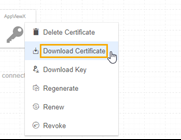 The Download Certificate pop-up window is displayed.
 -
In the Download Certificate pop-up window that is displayed, select the
file format from the Certificate type dropdown and click
Yes.
Note: For PEM and DER certificate types, you can use turn the Download Truststore Certificates toggle On/Off.The certificate(s) is downloaded to your local machine.