Delete
You can delete a root CA or a subordinate CA. Once the CA has been deleted, no new certificates can be issued from this CA and no new CRLs will be generated.
Before you begin:- Deletion action will affect any auto-enrollment settings, policies, or workflows that are using the CA to issue or revoke certificates.
- Check for any unrevoked and unexpired certificates that may have been deleted from the AppViewX inventory by running a CA discovery to get all the valid certificates issued by that CA for revocation.
- To continue uninterrupted OCSP operations, replace the active OCSP certificate issued by the CA by going to PKI+ > Validation Authority.
- You can delete the root CA only after deleting all the subordinate CAs associated with it.
To delete CA:
-
Go to
 (Menu) icon > PKI+ > CA
Inventory.
The CA Inventory page appears.
(Menu) icon > PKI+ > CA
Inventory.
The CA Inventory page appears. - Select the checkbox against the CA you want to delete.
-
Click Actions and select Delete from the dropdown menu.
 Note:
Note:- You can delete root CA only after deleting its subordinate CAs.
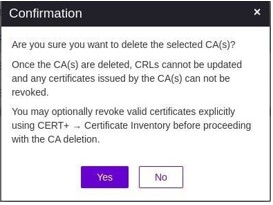
- If you are deleting a PKIaaS root CA or a subordinate CA, then you get a message, Are you sure you want to delete the selected CA(s)? irrespective of whether there are valid certificates issued by the CA or not.
- If the CA was enabled at least once, then you get a message, Once the CA(s) are deleted, CRLs cannot be updated and any certificates issued by the CA(s) can not be revoked (AND) You may optionally revoke valid certificates explicitly using CERT+ → Certificate Inventory before proceeding with the CA deletion.
-
Click Yes to proceed.
The delete workflow is triggered. The approval status of the CA changes to Delete - Approval Pending. If you want to abort the action, then click Abort.
-
An email from AppViewX PKIaaS for approval is sent to all active custodians.
Once the approval meets the quorum value, the approval status of the CA changes
to Delete - Approved and the status changes to Deleted. If the
request is rejected, then the approval status of the CA changes to Delete -
Rejected. Click Resubmit if the action fails for any reason.
A message that the operation is successful appears.Note: If deletion fails, reach out to [email protected].