Automatic Diagnosis and Remediation Tool
Overview
The automatic remediation tool is used to check the health of the Kubernetes cluster after the installation, patch deployments or upgrades. You can choose to perform only diagnosis or a remediation along with the diagnosis of the various Kubernetes components and the services.
In diagnosis only the logs of the issues encountered are collected and saved in a file, while in remediation, the utility attempts to fix the issues encountered during the diagnostic process.
This tool can also be used before the patch and upgrade process to determine if users can proceed with the deployment process.
Diagnosis and Remediation Process
To initiate the remediation process
-
Navigate to the appviewx_kubernetes/scripts folder and
execute the command below.
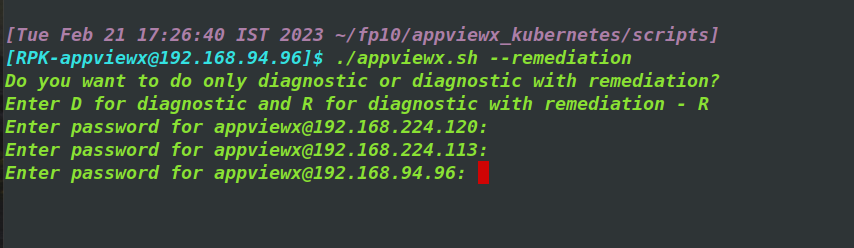
./appviewx.sh --remediationYou will be prompted to perform a diagnosis or diagnosis with remediation.
-
Enter D for diagnosis only and R for diagnosis with remediation.
Note: To check for infra readiness use only D.
-
Enter the password if required and continue (for passwordless applications
no passwords will be asked).
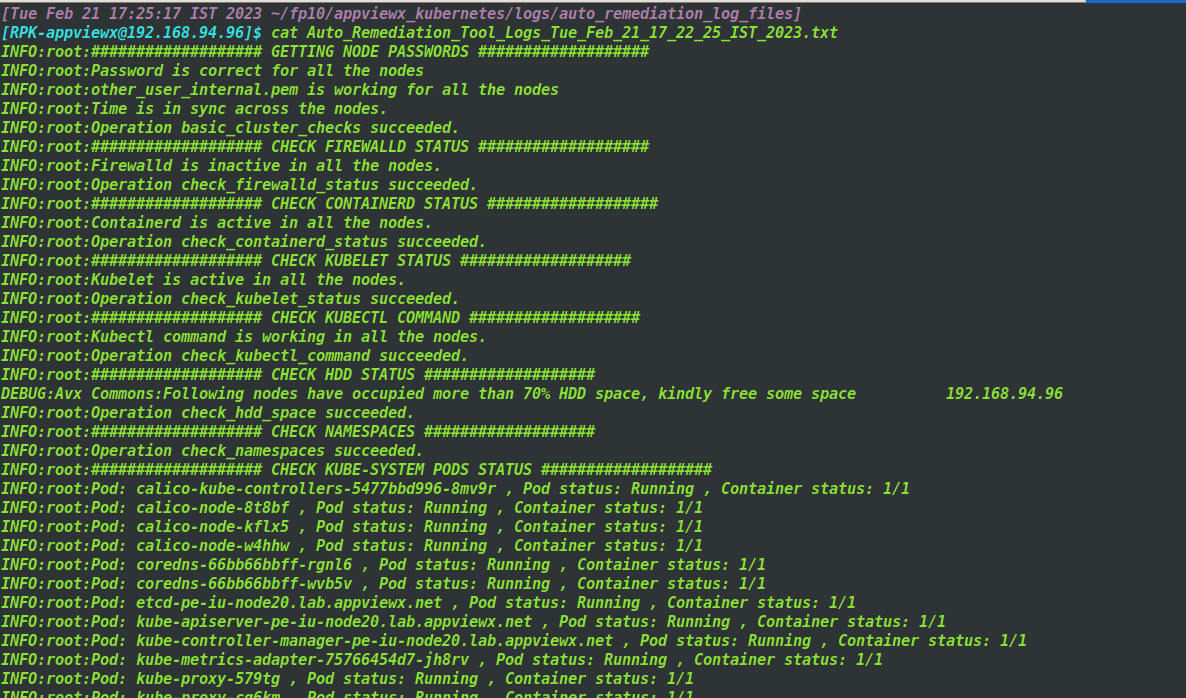
- After the process is completed the log files are stored in the location $installer_directory/appviewx_kubernetes/logs/auto_remediation_log_files
Auto Remediation Tool Validations
The following validations are added in auto-remediation tool:
-
Firewalld status check
The firewalld status is checked in all the nodes. By default it should be disabled, but if found in the running state in any node, then the script throws an error.
-
Containerd status check
The containerd status is checked in all the nodes. By default it should be running, but if found in the not running state, then the script throws an error.
-
Kubelet status check
The kubelet status is checked in all the nodes. By default it should be running, but if found in the not running state, then the script throws an error.
-
Kubectl command check
The Kubectl command checked to see if they are working as expected in all the nodes.
-
Hard disk space check
The hard disk usage is checked in all the nodes. If the hard disk usage is more than 70% in any node then the script throws an warning message to free some space.
-
Namespace check
This check is used to find if the avx and dc namespaces are present in the cluster.
-
Kube-system pod status check
The pods of the kube-system namespace are checked to see if the are in the running state.
-
Mongodb pod status check
The mongodb pods are checked to see if the are in the running state.
-
Istio-system pod status check
The pods of the Istio-system namespace are checked to see if the are in the running state.
-
Config-server pod status check
The config-server pods are checked to see if the are in the running state.
-
Consul server status check
The consul server pods are checked to see if the are up; if they are up it then checks if the consul server leader is present.
-
Active OpenBao status check
The active vault pods are checked to see if the are up; if they are up it then checks if the active vault is present.
-
Ephemeral OpenBao status check
The ephemeral vault pods are checked to see if the are up; if they are up it then checks if the active vault is present.
-
DC namespace’s pod status check
This checks the pod status of all DC namespaces to see if are up and running.
-
Calico status check
It checks to see if the calico is working as expected.
-
Istio proxy status check
It checks to see if the istio proxy is working as expected.
-
SElinux status check
This checks to see if the SElinux status is as expected. It should be either permissive or disabled
-
Proxy check
This checks for the proxy status. It should disabled by default.
-
Plugin helm chart check
This checks if helm charts are present for the plugins which are added in the ENABLED_PLUGINS parameter of appviewx.conf file.
-
Infra helm chart check
It checks if helm charts are present for the required infra components.
-
Mongo URL check
It checks if the Mongo URLs are properly updated in avx-common-config config map of the avx and DC namespaces. If they are not then should be updated with the proper values.
-
OpenBao URL check
It checks if the Vault URLs are properly updated in avx-common-config config map of the avx and DC namespaces.
-
Database password check
It checks if the database password is properly updated in avx-common-config config map of the avx and DC namespaces.
-
Super User password check
It checks if the super user password is properly updated in avx-common-config config map of the avx and DC namespaces.
-
Collect TCPDUMP logs
It collects the TCPDUMP logs for all the servers in the cluster.
-
Checking Registered VMs in gateway config
It checks if the VMs (Pod URL) are accurate in the Registered VMs parameter of the Gateway config map.
appviewx.sh --remediation -R- Firewalld status check
- Containerd status check
- Kubelet status check
- Kubectl command check
- Mongo URL check