Accessing Host Terminals
You can access the host terminals in any of the following ways:
- If you have the password to the infra access server, then click the Open with Password option on the Access Request page.
- If you do not have the password to the infra access server, then request
access as described in Requesting Access to Terminals. Once access is
granted, you can:
- Click the Name hyperlink of the infra access group.
- Access the terminals from the Device Management page or the
Host Inventory page by clicking the
 (Terminal Connect) icon.
To access the host terminal:
-
Go to
 (Menu) icon > SSH+ > Access Control.
The Terminal Access Control page is displayed.
(Menu) icon > SSH+ > Access Control.
The Terminal Access Control page is displayed. -
Click the Name hyperlink of the infra access group.
The terminal page opens with all the associated hosts as shown.
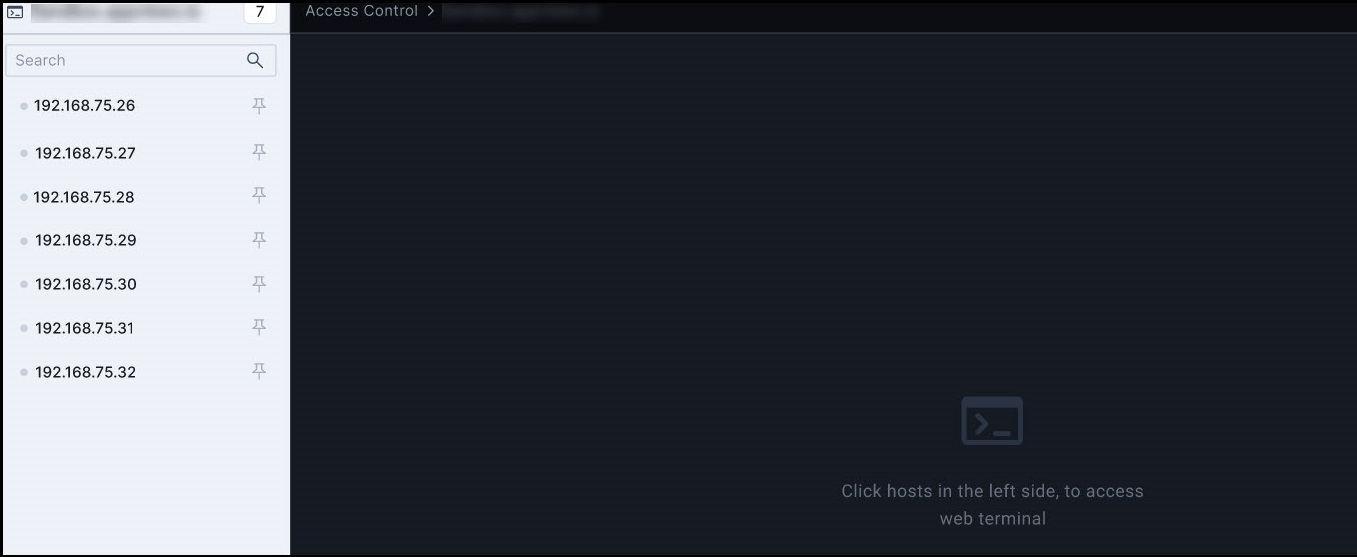
- Click any of the hosts to access the web terminal.
-
Enter your credentials.
You can now perform various tasks such as running scripts, executing commands, and troubleshooting issues.Note:
- You can access more than one host at a time within each infra access
group. On selecting multiple hosts, the hosts open in the split
screen view. You can alternate between split or tab view by clicking
using (
 ) icon on the RHS of the page.
 - You can pin only four terminals for better access and management
using the
 (Pin) icon.
- You can access more than one host at a time within each infra access
group. On selecting multiple hosts, the hosts open in the split
screen view. You can alternate between split or tab view by clicking
using (