Submit Request
Creates a new workflow request for the given workflow name. A request id is generated and associated with each submitted workflow request which can be used later for retrieving any information about the request.
Before you begin
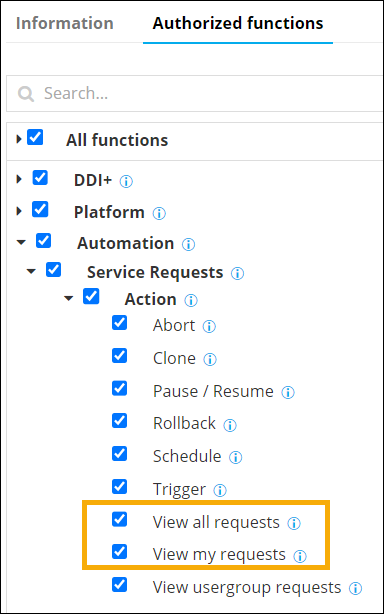
- Service Requests > Action > View all requests
- Service Requests > Action > View my requests
Request Structure
| Endpoint: | /visualworkflow-submit-request |
| Type: | POST |
| Sample URL: | https://<IP/HostName/TenantName>:<GWPORT>/avxapi/visualworkflow-submit-request?gwsource=externalTo understand the elements of the sample URL, click here. |
| Headers: | |
| Content-Type: | application/json |
| Name | Description |
|---|---|
| sessionID
|
(Mandatory) Use session ID retrieved from login
API is required if username and password are not
provided. Example: "sessionId": "ce7f1a14-2bf9-4e4a-89a8-bc780a255813" |
| username
|
(Mandatory) AppViewX login username is required if
sessionId is not provided. Example: "admin" |
| password
|
(Mandatory) AppViewX login password is required if
sessionId is not provided.. Example: "AppViewX@123" |
| Content-Type
|
(Mandatory) The parameter should be set to
application/json to specify the nature of
the data in the payload. Example: "application/json" |
| gwsource
|
(Mandatory) Source from which the request is
triggered. The values can be:
|
| Payload
|
(Mandatory) Input data for request body in
application/json format. For payload details, see Payload
section. Any one of the following: |
Task Specific Information
Service
                                                Task Payload
| Name | Description |
|---|---|
| workflowName
|
(Mandatory) The workflow for which the request is
submitted. Type:
Example: "servicenow Test" |
Sample Request/Response
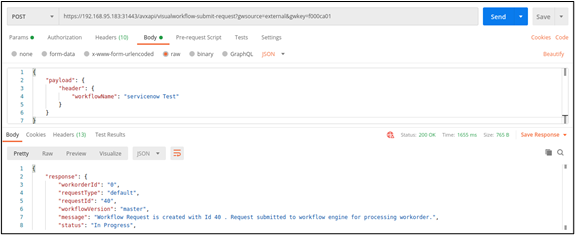
Use CaseSubmit a request for the workflow servicenow Test.
https://<IP/HostName/TenantName>:<GWPORT>/avxapi/visualworkflow-submit-request?gwsource=external{
"payload": {
"header": {
"workflowName": "servicenow Test"
}
}
}{
"response": {
"workorderId": "0",
"message": "Workflow Request is created with Id 401 . Request submitted to workflow engine for processing workorder.",
"requestType": "default",
"requestId": "401",
"workflowVersion": "master",
"status": "In Progress",
"statusCode": 0
},
"message": null,
"appStatusCode": null,
"tags": null
}
| Name | Description |
|---|---|
| workflowName
|
(Mandatory) The workflow for which the request is
submitted. Type:
Example: "Sample 2" |
| Input Payload | |
| input
|
(Mandatory) The input data for the user task.
Type:
|
| requestData
|
(Mandatory) The request data for which the request is
submitted. List of Request Data Payloads. |
| Request Data Payload | |
| scenario
|
(Mandatory) The scenario name for the form.
Type:
Example: "scenario" |
| sequenceNo
|
(Mandatory) The sequence number of the scenario.
Type:
Example: "2" |
| fieldInfo
|
(Mandatory) The field info configured in the form. The
value should be key value, field id and its value.
Type:
Example: "deviceName": "ADC" |
| task_action
|
(Mandatory) Action to be performed on the task.
Type:
Constraints: 1 for success case and 2 for reject case. Example: "1" |
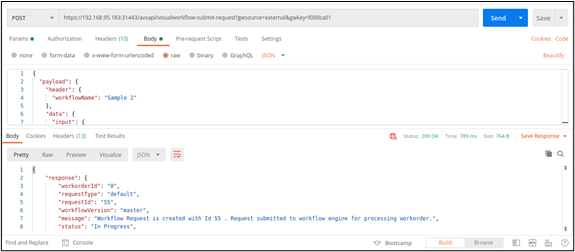
Sample Request/Response - Form Task
Use Casehttps://<IP/HostName/TenantName>:<GWPORT>/avxapi/visualworkflow-submit-request?gwsource=external{
"payload": {
"header": {
"workflowName": "Sample 2"
},
"data": {
"input": {
"requestData": [
{
"scenario": "scenario",
"sequenceNo": 1,
"fieldInfo": {
"deviceName": "ADC"
}
},
{
"scenario": "scenario2",
"sequenceNo": 2,
"fieldInfo": {
"deviceName": "A10"
}
}
]
},
"task_action": 1
}
}
}{
"response": {
"workorderId": "0",
"message": "Workflow Request is created with Id 55 . Request submitted to workflow engine for processing workorder.",
"requestType": "default",
"requestId": "401",
"workflowVersion": "master",
"status": "In Progress",
"statusCode": 0
},
"message": null,
"appStatusCode": null,
"tags": null
}
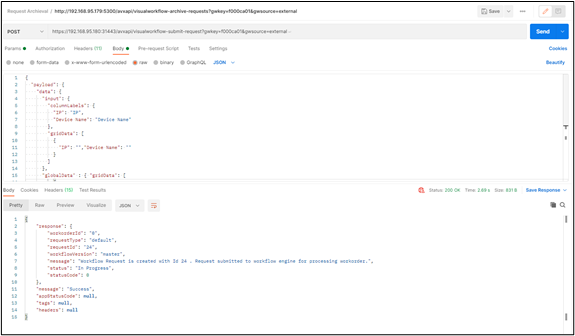
Sample Request/Response - Grid Task
Use CaseSubmit a request for the workflow with the first task as Grid.
https://<IP/HostName/TenantName>:<GWPORT>/avxapi/visualworkflow-submit-request?gwsource=external{
"payload": {
"data": {
"input": {
"columnLabels": {
"IP": "IP",
"Device Name": "Device Name"
},
"gridData": [
{
"IP": "","Device Name": ""
}
]
},
"globalData" : { "gridData": [
{
"IP": "192.168.15.35",
"Device Name": "Device F5"
},
{
"IP": "192.168.15.40",
"Device Name": "Device AVI"
}
]},
"task_action": 1
},
"header": {
"workflowName": "Grid"
}
}
}<%gridData%> should be present in the “values”
section in Grid Task.{
"response": {
"workorderId": "0",
"message": "Workflow Request is created with Id 24 . Request submitted to workflow engine for processing workorder.",
"requestType": "default",
"requestId": "401",
"workflowVersion": "master",
"status": "In Progress",
"statusCode": 0
},
"message": null,
"appStatusCode": null,
"tags": null
}
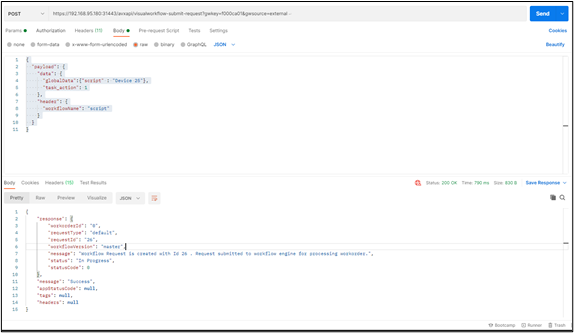
Sample Request/Response - Script Task
Use CaseSubmit a request for the workflow with the first task as Script.
https://<IP/HostName/TenantName>:<GWPORT>/avxapi/visualworkflow-submit-request?gwsource=external{
"payload": {
"data": {
"globalData":{"script" : "Device 25"},
"task_action": 1
},
"header": {
"workflowName": "script"
}
}
}{
"response": {
"workorderId": "0",
"message": "Workflow Request is created with Id 26. Request submitted to workflow engine for processing workorder.",
"requestType": "default",
"requestId": "401",
"workflowVersion": "master",
"status": "In Progress",
"statusCode": 0
},
"message": null,
"appStatusCode": null,
"tags": null
}
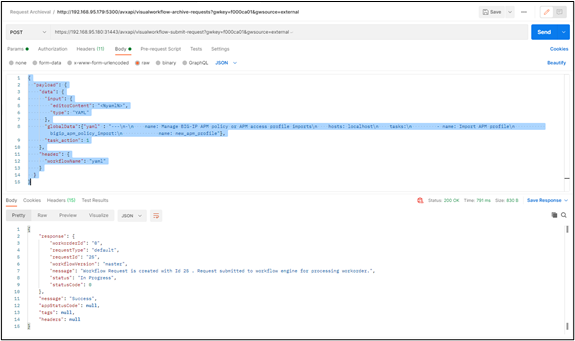
Sample Request/Response - YAML Task
Use CaseSubmit a request for the workflow with the first task as YAML.
https://<IP/HostName/TenantName>:<GWPORT>/avxapi/visualworkflow-submit-request?gwsource=external{
"payload": {
"data": {
"input": {
"editorContent": "<%yaml%>",
"type": "YAML"
},
"globalData":{"yaml" : "---\n-\n name: Manage BIG-IP APM policy or APM access profile imports\n hosts: localhost\n tasks:\n - name: Import APM profile\n bigip_apm_policy_import:\n name: new_apm_profile"},
"task_action": 1
},
"header": {
"workflowName": "yaml"
}
}
}<%yaml%> should be present in the YAML
task.{
"response": {
"workorderId": "0",
"message": "Workflow Request is created with Id 26 . Request submitted to workflow engine for processing workorder.",
"requestType": "default",
"requestId": "401",
"workflowVersion": "master",
"status": "In Progress",
"statusCode": 0
},
"message": null,
"appStatusCode": null,
"tags": null
}
Response Structure
- Status Code: 200 OK
- Message: Success
- Headers:
- Content-Type: application/json
| Name | Description |
|---|---|
| response
|
Contains the response params for the search object request.
For more |
| message
|
Success message or failure description in case of error. |
| appStatusCode
|
Application specific status code for the response, will be non-null for failure response. |
| tags
|
More info in case of failure response. |
| Name | Description |
|---|---|
| requestID
|
Unique identifier for the request. |
| workflowVersion
|
Version of the workflow. |
| message
|
The message with the status and request number for the request. |
| status
|
Status of the request. |
| statusCode
|
Status code of the request |
| requestType
|
The type of the request. |
| workorderId
|
The workoderId for the request. If there is no workorder the value will be 0. |
Status Codes
| HTTP Code | appStatusCode | Message and Remediation |
|---|---|---|
| 200 OK | NA | Success |
| 400 Bad request | avx-common-028 | Invalid/Incorrect payload. Possible Remediation: Check and ensure if a valid value is given in request payload field - input. |
| 401 Unauthorized | WORKFLOW_1679 | User is not authorized. Possible Remediation: LoggedIn user is not authorized to access the workflow. |
| 404 Not Found | engine-db-015 | Workflow not found. Possible Remediation: Invalid workflow data. |
| 409 Conflict | WORKFLOW_1475 | Given workflow is not in enabled state. Possible Remediation: Given workflow is not in enabled state. |
| 500 Internal Server Error | WORKFLOW_1617 | Invalid form data. Please provide all mandatory
data. Possible Remediation: Check and ensure if a valid value is given in request payload field - input. |
| 500 Internal Server Error | NA | Error while processing. Possible Remediation:
|
Reference
- IP/HostName/TenantName: Replace with the actual IP address, hostname,
or tenant name based on the specific configuration in AppViewX.
- IP: A unique identifier assigned to each device connected to
a computer network that uses the Internet Protocol for communication
The IP address will be included in the endpoint URL for an on-prem deployment.
- HostName: A human-readable label assigned to a device (host)
on a network
The hostname will be included in the endpoint URL for an on-prem deployment.
- TenantName: An identifier label for a tenant given to
indicate which tenant's data the API request will
access/modify
The tenant name will be included in the endpoint URL for a SaaS deployment.
- IP: A unique identifier assigned to each device connected to
a computer network that uses the Internet Protocol for communication
- GWPORT: AppViewX gateway port
A gateway port refers to a network port through which data is sent and received to communicate with a gateway in an on-prem deployment.
Example: 31443
- avxapi: Path parameter value (static) that is part of the endpoint's URL
- Endpoint: Endpoint of the API, for example: execute-hook
- gwsource: Source or origin of a gateway, for example: external.