Configuring General Settings
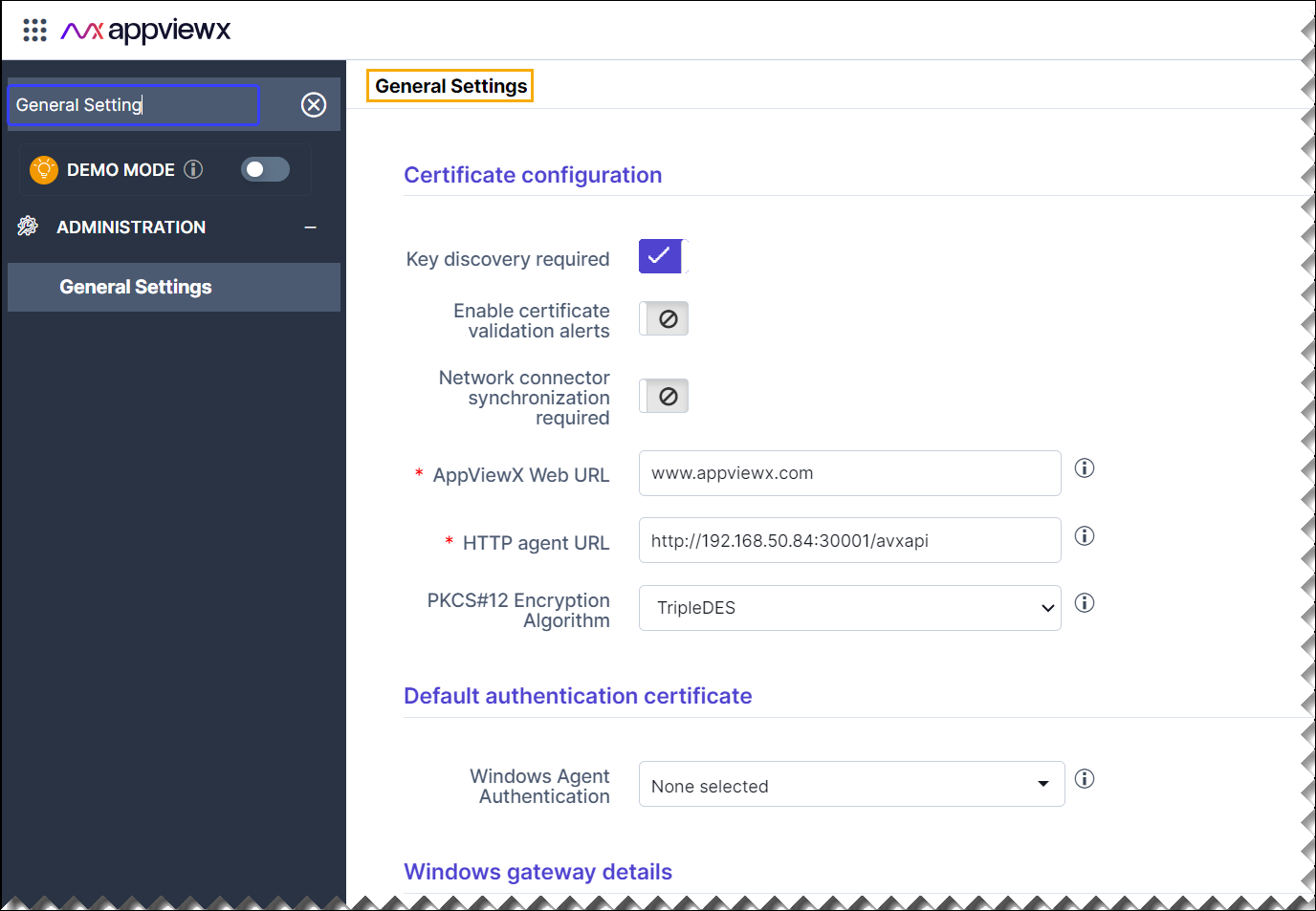
The Certificate Configuration section manages key discovery, certificate alerts, and external agent connection settings. The Default Authentication Certificate allows the selection of a certificate for authenticating Windows agents. The Windows Gateway Details configure interactions with Windows systems, specifying the gateway's name, URL, and a client authentication certificate. This page is crucial for ensuring secure communication between AppViewX CERT+ and external systems, enabling automated certificate management and secure key handling.
-
Go to
 (Menu) > CERT+ >
ADMINISTRATION, and then click General
Settings.
(Menu) > CERT+ >
ADMINISTRATION, and then click General
Settings.
-
Select/Enable the Certificate Configuration
parameters.
Table 1. Field description for Certificate Configuration Section Fields Description Key discovery required Default: Enabled. If enabled (as shown), this setting requires the platform to perform key discovery. This means CERT+ will attempt to find private keys associated with certificates when importing or managing certificates in the system.
Enable certificate validation alerts Default: Disabled. If enabled, the system would notify administrators or users of issues like certificate validation failures, expired certificates, or other alert-worthy conditions related to certificates.
Network connector synchronization required Default: Disabled. This setting, when enabled, ensures synchronization between the CERT+ platform and external network connectors. It is useful for ensuring that the certificate data is consistent across networked systems.
*AppViewX Web URL This field contains the base URL for the AppViewX web interface (in this case, www.appviewx.com). This URL is used send the client certificate to email address specified during certificate creation.*HTTP agent URL Specifies the URL for the HTTP agent. The URL shown here (for example: https://pe-cert-ecosystem-xxx.abc.appviewx.net:xxxx/...) is used to perform CRL check for AppViewX issued certificate.PKCS#12 Encryption Algorithm Default: TripleDES. In this case, the encryption algorithm selected is Triple DES. This option controls the algorithm used to encrypt PKCS#12 files, which are used to bundle private keys with certificates. The available options are:- TripleDES
- AES.
*: Mandatory fields -
Select the Default authentication certificate
parameter.
Table 2. Field description for Default authentication certificate Section Field Description Windows Agent Authentication Default: None Selected. This dropdown allows the selection of a certificate for use with Windows Agent Authentication. This certificate would authenticate the Windows agent communicating with AppViewX, ensuring secure interactions.
-
Select the Windows gateway details parameters.
Table 3. Field description for Windows gateway details Section Field Description *Windows gateway name It is used to specify the name of the Windows gateway that the AppViewX CERT+ platform will communicate. *Windows gateway URL It should contain the URL or IP address of the Windows gateway. The gateway facilitates communication between the AppViewX platform and Windows environments, such as for certificate distribution or renewal. Client Authentication Certificate Default: filename.pkcs The field shows an input box where a .pkcs file can be uploaded. This file would contain the client authentication certificate, which is used to securely authenticate the connection between AppViewX and the Windows gateway. The certificate helps establish secure communication between the two systems.
The Upload button allows you to upload the <.pkcs> file containing the client certificate
*: Mandatory fields - Click Add.
- Click Save.
- To reset the selected/entered details, click Reset.