IP Compliance
DDI+ empowers enterprises to gain comprehensive insights into the compliance of IP addresses distributed across IPAM, CMDB, and Load Balancers. By seamlessly integrating with IPAM and CMDB, it facilitates the correlation of IP addresses with CMDB assets, enabling the identification of ownership and detection of any discrepancies in IPAM and CMDB data. The solution ensures synchronization between CMDB and IPAM, highlighting IPs lacking ownership information and providing visibility into potential violations between load balancer, IPAM, and ADC IP addresses. Additionally it provides app-centric correlation across IPAM, CMDB, Load Balancers and Firewalls.
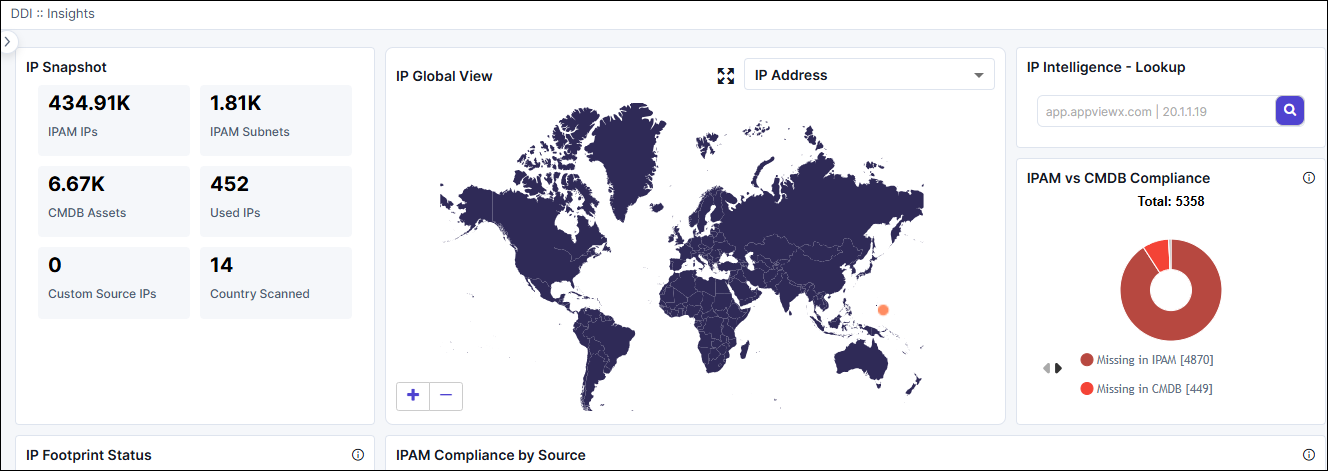
- IP Compliance Dashboard
- Provides end-to-end visibility into the IP estate and identifies any violations across IPAM, CMDB, and Load Balancers.
- Comprehensive overview of IP compliance status.
- IP Search
- Enables users to search for IP addresses or FQDNs, providing application-centric visibility across IPAM, CMDB, Load Balancers, and firewalls.
- Quick and targeted access to IP-related information.
- IP Hygiene
- Ensures compliance across CMDB and IPAM by allowing users to update information through a self-service form, streamlining the process.
- Efficient maintenance of accurate and compliant IP information.
Configuring IP Compliance
To configure compliance reports and build the compliance dashboard, the following steps needs to be performed:
- Integrate CMDB: Configure the DDI+ platform with the tables in CMDB from which CMDB IP asset information needs to be synced.
- Integrate IPAM: Onboard the IPAM vendor and select the pre-configured CMDB settings in AppViewX.
- Integrate ADC: Onboard ADC vendors in AppViewX to obtain ADC IP correlation and identify compliance violations.
- Integrate Firewall: Onboard Firewall vendors in AppViewX to obtain firewall NAT IP correlation. Identify Public to Private translation and view translate IP meta data and correlation.