Configuring Infoblox
-
Go to DDI+ > INTEGRATION HUB, and
then click Add new vendor.
The Select vendor page is displayed.
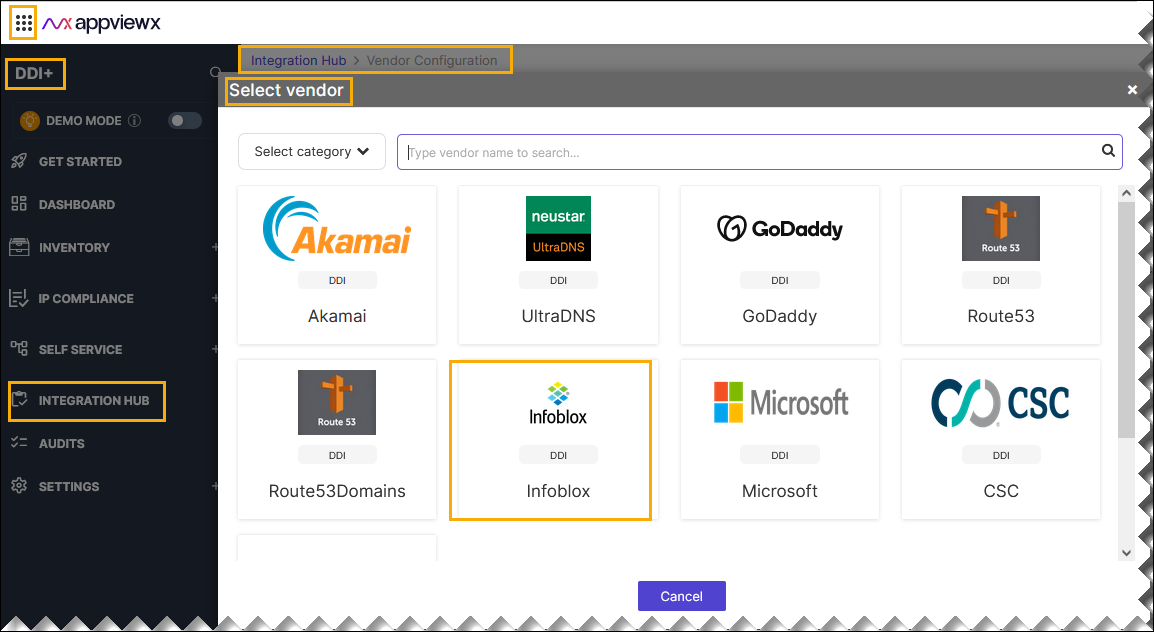
- On the Select Vendor page, click Infoblox.
-
On the Vendor Configuration page, under the
Information section, enter or select the required
field information.
The following table describes the various fields in this section:
Field Description *Name Enter a unique name to identify the vendor account which is being configured. Description Enter a description for the purpose of configuring this vendor, if required. Data center Select a data center from the options available in the dropdown list. *: Mandatory fields -
On the Vendor Configuration page, under the Credentials section,
enter or select the required field information.
The following table describes the various fields in this section:
Field Description Auth type Displays the Basic Auth method of authentication selected by default. *Username Enter valid username. *URL Enter API URL for the vendor with the HTTPS/HTTP protocol. *Passowrd Enter the valid password. *: Mandatory fields - Enable Sync IPAM for parsing the IP Address Management (IPAM) data of the vendor.
- Enable Config sync for parsing the vendor.
-
On the Vendor Configuration page, under the Configurations
section, turn on the Enable Advanced Config toggle to add additional
vendor configuration attributes.
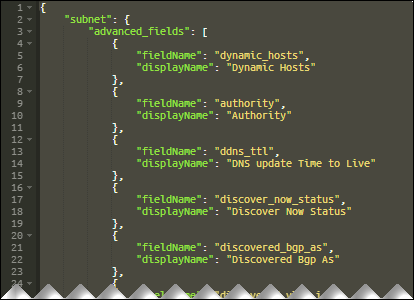 Sample Schema:
{ "subnet": { "advanced_fields": [ { "fieldName": "dynamic_hosts", "displayName": "Dynamic Hosts" }, { "fieldName": "authority", "displayName": "Authority" }, { "fieldName": "ddns_ttl", "displayName": "DNS update Time to Live" }, { "fieldName": "discover_now_status", "displayName": "Discover Now Status" }, { "fieldName": "vlans", "displayName": "Vlans" } ], "supernet": { "sync": true, "advanced_fields": [ { "fieldName": "utilization", "displayName": "Utilization" } ] } }, "ipv4address": { "advanced_fields": [ { "fieldName": "discover_now_status", "displayName": "Discover Now Status" } ] }, "ipam": { "classCLimit": 500, "classB1Limit": 4, "classB2Limit": 100, "ipPaginationLimit": 10000, "subnetPaginationLimit": 1000 }, "dns": { "recordsPaginationLimit": 1000, "zonesPaginationLimit": 1000, "zoneLimit": 500, "scriptApiLimit": 100 }, "custom_action": { "name": "" } }The following table explains the strings in the JSON schema:
Strings Description subnet > advanced_fields dynamic_hosts The total number of DHCP leases issued for a network refers to the count of unique IP addresses that have been dynamically assigned. authority The "authority" for a DHCP network typically refers to the entity responsible for managing and maintaining the DHCP server infrastructure. ddns_ttl The DNS update Time to Live (TTL) value of a DHCP network object. discover
_now_statusCurrent status of immediate discovery for this network. discovered
_bgp_asNumber of the discovered BGP AS. discovered
_vlan_idIdentifier of the discovered VLAN. discovered
_vlan_name
Name of the discovered VLAN. discovered
_vrf_description
Description of the discovered VRF. discovered
_vrf_name
Name of the discovered VRF. discovered
_vrf_rd
Route distinguisher of the discovered VRF. discovery
_engine_type
Network discovery engine type. total_hosts Total number of DHCP addresses configured in the network. vlans List of VLANs assigned to Network. subnet > supernet > advanced_fields utilization The network utilization in percentage. ipv4address > advanced_fields discover
_now_status
Current status of immediate discovery for this address. classCLimit Number of Class C subnets to be parsed in a single child request. Note: If this number is reduced, number of child workflows will increase.classB1Limit Number of class B1 (/16 to /19) subnets to be parsed in a single child request. Note: If this number is reduced, number of child workflows will increase.classB2Limit No of class B2 (/20 to /23) subnets to be parsed in a single child request. Note: If this number is reduced, number of child workflows will increase.ipPagination
Limit
Number of IPAddresses to be fetched in a single Infoblox ipv4 API call. subnet
Pagination
Limit
Number of Subnets to be fetched in a single Infoblox network API call. records
Pagination
Limit
Number of Records to be fetched in a single Infoblox records API call. zones
Pagination
Limit
Number of Zones to be fetched in a single Infoblox auth_zone API call. scriptApiLimit Number of records APIs to handle in a single script call. custom
_action > name
Custom workflow name to be triggered after the Infoblox sync is complete *: Mandatory fields - Select CMDB Source from the dropdown list to correlate IPAM data with the CMDB.
- Click Finish.