Viewing Service Requests
All the workflow requests triggered from the DDI+ module can be viewed in one place in
the Service Requests section.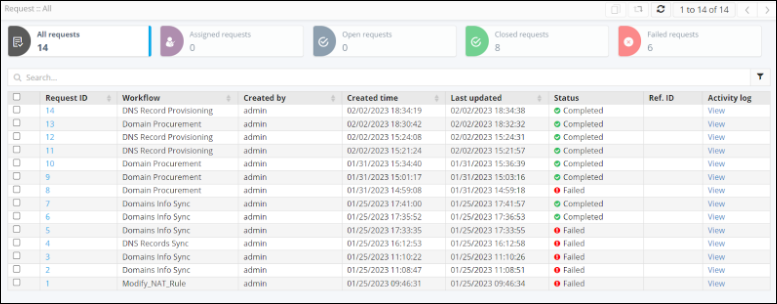
This page
displays the following information:
| All requests | The total number of requests triggered for domain and DNS management. |
| Assigned requests | The total number of requests assigned to a particular user. |
| Open requests | The total number of open requests (requests that are still running) in DDI+ module. |
| Closed requests | The total number of closed requests (requests successfully triggered and completed) in DDI+ module. |
| Failed requests | The total number of failed requests (requests that did not execute successfully) in DDI+ module. |
- To see the stage-wise execution of a workflow, click on the Request ID for that workflow.
-
To clone a service request, select the request and click the
 (Clone) icon from the
command bar in the top right corner of the screen.
(Clone) icon from the
command bar in the top right corner of the screen.
-
To refresh the page, from the command bar in the top right corner of the page,
click the
 (Refresh) icon.
- To view the stage-wise summary and work order logs for each service request, under the Activity log column, click View.