Setting ACL Permissions to Key Compliance Groups
You can assign/unassign resources the following access control list (ACL) permissions to key compliance groups:
- RW denotes that users have Read-Write permissions to the key compliance groups. Users can modify and delete key compliance groups. Users can view the keys associated with the key compliance groups and perform any of the actions in the inventory.
- R denotes that users have Read permissions to only view details displayed on the Key Compliance Group page. Users can only view the keys associated with the key compliance groups but cannot perform any action in the inventory.
- If R or RW permission is not assigned, then users will not be able to view the key compliance groups and the keys associated with them.
To assign ACL permission to key compliance groups:
-
Go to
 (Menu) icon > Platform > Identity > Resource.
- Click a resource name.
-
Click Access Control tab and select SSH Key Groups from the
list.
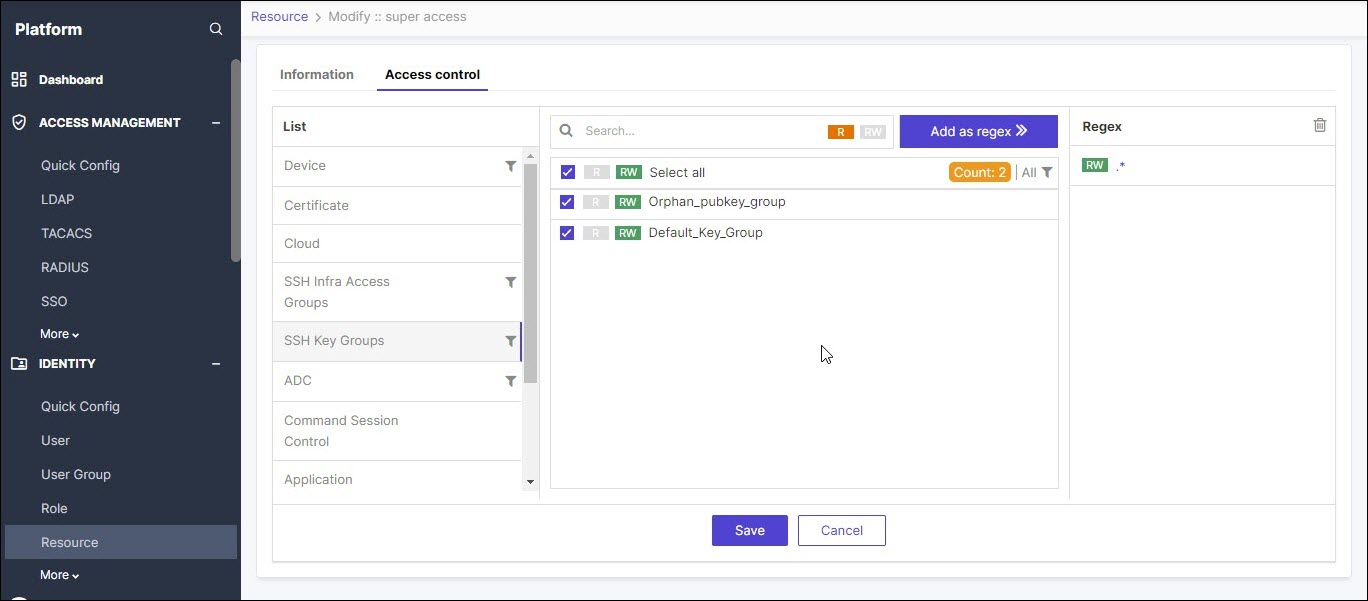 The key groups are displayed on the right.
 - Select the key group for which you want to assign permission by clicking the check box.
- Click R or RW button to assign the read or read-write permission.
-
Click Save.
A message, Successfully assigned/unassigned SSH groups data for resource super access, appears.Note: On deleting a resource, all ACL permissions from the associated key compliance groups are also removed.