Purging Alerts
To enable purging of alert records:
-
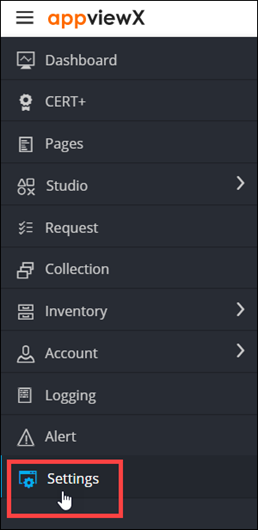
To access the navigation pane, in the top-left corner of the screen, hover the
mouse pointer over the
 icon.
icon.
-
From the menu displayed, click Settings.
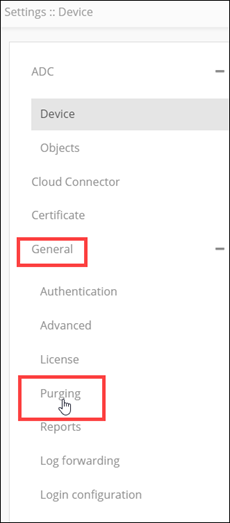
- On the Settings page, from the navigation pane on the left, click General.
-
Under General settings, click
Purging.
The Settings :: Purging screen is displayed, with the Alert tab open by default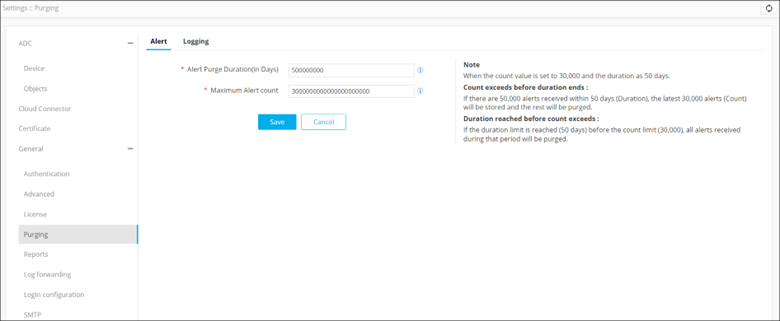
. -
Enter the following details:
Field Description *Alert Purge Duration (in Days) Enter the number of days, the interval, after which the alerts will be purged. *Maximum Alert count Enter the maximum number of the most recent alerts that have to be retained. For example, if you set this value to 10,000, all alerts after the most recent 10,000 alerts will be purged. All * marked fields are mandatory. Note: Excess alerts will be purged even if the maximum alert count is exceeded before the next purging cycle is scheduled. - Click Save.