Creating a Query Explorer Hook
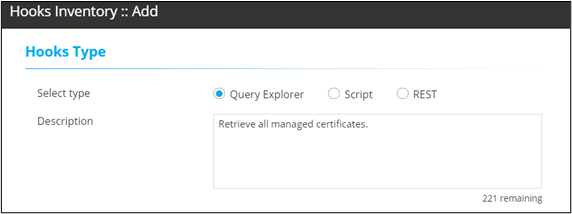
- In the Hooks Inventory :: Add window, under Hooks Type, select the Query Explorer option.
-
Add a description for the selected hook.
-
Under Query Explorer Details, enter or select the field
information.
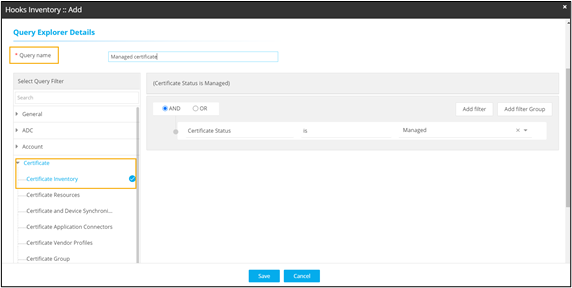
The following table describes the various fields in the Query Explorer Details section:Field Description *Query name Enter a valid query name. For example, Managed certificates.
Select Query Filter Select an appropriate query filter from the pre-populated list of filters. For example, Certificate Inventory under Certificate section.
Add Filter Add a filter and select appropriate fields from the predefined values. For example, Certificate Status is Managed.
AND/OR Select the appropriate conditional parameters depending on the type of output required in the report.
AND: Report will reflect data satisfying all the filter conditions.
OR: Report will reflect data satisfying either of the filter conditions.
All asterisk (*) marked fields are mandatory. - To add this new hook to the list of existing hooks, click Save.