Widget
A widget allows you to arrange data in a visually striking display. Only metric charts can
be used to create widgets. The Reports :: Canvas page shows the
list of pre-built widgets available for the user.
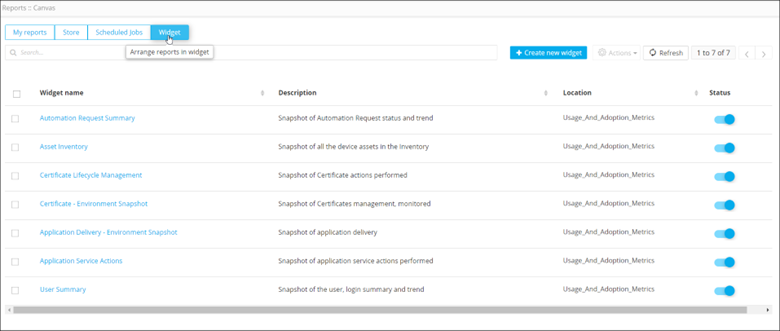
This table describes the options available under the Widget page:
| Options | Description |
|---|---|
| Search bar | Searches for the given keyword(s) in the field and produces results featuring the searched keyword(s). |
| Create new widget | Allows you to create a new widget. |
| Actions | Allows you to perform actions (pin, bulk, clone, delete) on the reports. Note: This option is enabled only when a
report(s) is selected.
|
| Refresh | Refreshes the page. |
| Widget name | Displays the names of the widget. |
| Description | Displays a brief description of the widget. |
| Location | Displays the location of the widget on the dashboard. |
| Status | Displays whether a widget has been enabled or is disabled. |