Actions on HA Devices and Device Failover 
AppViewX recommends to enable Syslog-based configuration updates to reflect the device flip over on a near real-time basis.
To enable the Syslog based configuration updates:
-
Enable Show only active objects option from the Dashboard settings.
It ensures the widget is always updated with the latest active device objects whenever a device failover is identified.
Note: By default, this option is enabled.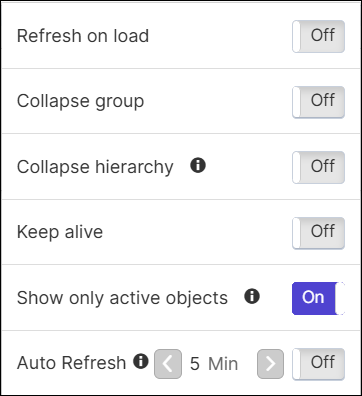
-
To disable this option, click the
 (Settings) icon on the dashboard page.
Following are other actions that can be performed by clicking the  Options on the
widget:
Options on the
widget:
-
Maximize
-
Minimize
-
Copy to - a copy of the widget can be placed from one dashboard to another dashboard by selecting the
 (Copy to) icon under (Options).
 -
Move to - any widget can be moved from one dashboard to another dashboard by selecting the
 (Move to) icon under (Options).
 -
Download - contents of an Application view widget can be downloaded in .csv format to your local system by selecting the
 (Download) icon
under
(Options).
(Download) icon
under
(Options). -
Delete - a group, object, or action can be deleted from an Application view widget by selecting
(Options) > (Settings) >
Groups/Objects/Actions, and then click Delete.