Getting Device Credentials Dynamically 
- Get device detail:
$$devicename.username$$ - Get device credential:
$$devicename.password$$
Note: Device(s) must be added in the Appviewx.
To get the device credentials dynamically during the workflow execution process:
- Go to the Integration Hub.
- Design a new workflow.
- Drag and drop relevant tasks.
- From the User Interface section in the left menu, drag and drop the YAML task.
- Add input data in the YAML format.
-
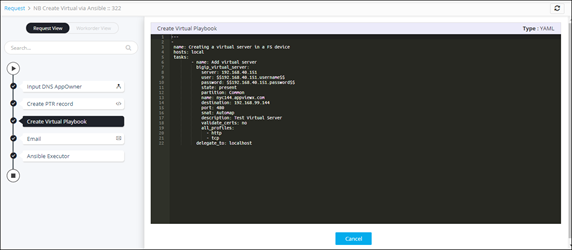
Enter the following syntax to get the device credentials dynamically.
Syntax Usage Sample --- - name: Creating a virtual server in a F5 device hosts: local tasks: - name: Add virtual server bigip_virtual_server: device: <Devicename or IP address> username: $$devicename.username$$ password: $$devicename.password$$ state: present--- - name: Creating a virtual server in a F5 device hosts: local tasks: - name: Add virtual server bigip_virtual_server: device: bigip.ltm.12.1 username: $$ bigip.ltm.12.1.username$$ password: $$ bigip.ltm.12.1.password$$ state: present - Connect the workflow tasks and enable the workflow.
-
Trigger the workflow.
Device details are fetched.