Actions Tab
On the Actions tab, you can customize the actions execution as needed
To customize the actions:
-
Go to Menu > ADC+ > SETTINGS > Module
Settings > ADC > Objects.
By default, the Actions tab appears.
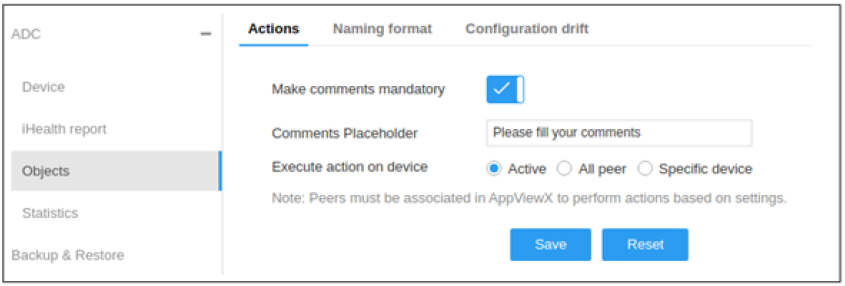
- Enable the Make Comments Mandatory toggle button to set the comments option mandatory while executing an action from the Control Center or dashboard. This ensures end users are mandated to mention the reason for their actions.
- Enter comments in the Comments Placeholder, such as SNOW ID, Enter Application impacted, etc. to impose a standard to be followed upon action execution.
- Select Active, All Peer, or Specific Device radio buttons for Execute Action on Device. By default, AppViewX actions are triggered on current Active devices. This can be modified as needed.
- Ensure Peers are associated in AppViewX for seamless execution.
- Click Save.
Note: To discard the changes, click Reset.