Openshift PaaS Orchestration 
- Offers a Kubernetes container platform to manage hybrid cloud deployments.
- Allows you to connect application deployed in OSE Container Platform to a variety of service brokers.
- OSB API manages applications defined by AppView catalogs.
- Enables PaaS Orchestration of application and PKI services.
- Accelerated application deployment.
To facilitate Openshift PaaS Orchestration:
- Design a new workflow.
-
To download the OSB Plugin manually, click
 icon above the
Start task.
Tip: You can also click on the Service Orchestration icon
icon above the
Start task.
Tip: You can also click on the Service Orchestration icon to install the plugin.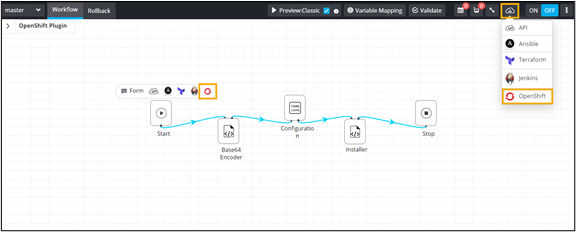
-
To install the AppViewX OSB plugin automatically, trigger the OpenShift Plugin
Installer workflow from the Request :: View/Run page.
The workflow execution page is displayed with the workflow inputs requested at the first stage.
-
Enter the OSB details in the fields.
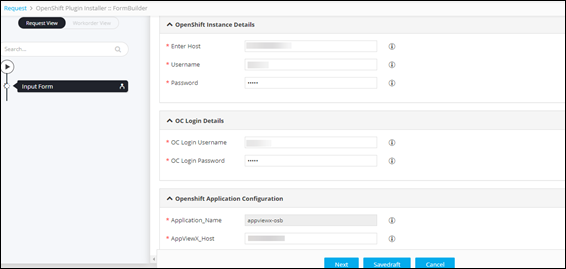
- To proceed with plugin installation, click Next.
-
Open the AppViewX Open Service Broker.
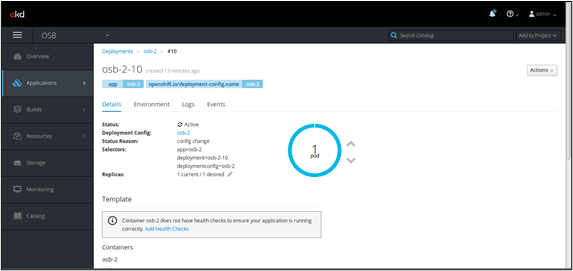
- View all automation catalogs in OpenShift once the AppViewX broker is installed.
-
To provision application and security services through AppViewX, click on any
Automation catalog.
Note: The following REST API is used to orchestrate and provision services between openshift and appviewx.
-
API: visualworkflow-get-all-workflows
Description: To fetch the list of workflows in the AppViewX environment
Method: POST.
Type Name Mandatory Description Header username yes AppViewX username Header password yes AppViewX password Header Content-Type yes application/json Header Accept yes application/json Query gwsource yes Source from which the request is triggered (Example, external) Format:
https://<application
                                    ip>:<gatewayport>/avxapi/visualworkflow-get-all-workflows?gwkey=<tenant
                                    key>&gwsource=<gateway source>
Sample Payload:
{"payload":{"sSearch":""}}Sample Response:
{"response":{"workflowTemplateList":[{"workflowName":"Create LTM HTTP Monitor","accessType":"RW","properties":{"version":"19.3.0","category":38,"categoryName":"F5 BIG-IP","subCategory":2,"subCategoryName":"Ansible","internalWorkflow":false,"readOnly":false,"hidden":false,"locked":false},"settings":{"disableRequestorSubmission":false,"tags":[],"hideWorkflow":false,"enableRequest":true,"confirmationAlert":true},"globalData":{},"_id":"5f1011f4b958f463955d2b6e","description":"","created_by":"admin","status":"Enabled","workflowCategory":"Default","workflowVersion":"master","activeForRequest":true,"activeForInventory":true}],"iTotalDisplayRecords":1},"message":null,"appStatusCode":null,"tags":null,"headers":null} -
API: visualworkflow-generate-api
Description: To generate the payload for specific workflow
Method: POST
Type Name Mandatory Description Header username yes AppViewX username Header password yes AppViewX password Header Content-Type yes application/json Header Accept yes application/json Query gwkey yes Tenant key Query gwsource yes Source from which the request is triggered (Eg: external) Format:
https://<application ip>:<gateway
                                    port>/avxapi/visualworkflow-generate-api?gwkey=<tenant
                                    key>&gwsource=<gateway source>
Sample Payload:
{"payload":{"workflowName":"Create LTM HTTP
                                    Monitor","workflowType":"Default","workflowVersion":"master"}}
Sample Response:
{"response":{"url":"<protocol>://<IP>:<port>/avxapi/visualworkflow-submit-request?gwkey=f000ca01&gwsource=WEB","actionId":"visualworkflow-submit-request","httpMethod":"POST","payload":{"payload":{"data":{"input":{"requestData":[{"sequenceNo":1,"scenario":"scenario","fieldInfo":{"device_ip":"192.168.40.214","device_name":"192.168.40.214","interval":"5","timeout":"2","monitor_name":"demmoo_monitor"}}]},"task_action":1},"header":{"workflowName":"Create LTM HTTP Monitor"}}}},"message":null,"appStatusCode":null,"tags":null,"headers":null} - API: visualworkflow-submit-request
Description: To submit a workflow request in AppViewX
Method: POST
Type Name Mandatory Description Header username yes AppViewX username Header password yes AppViewX password Header Content-Type yes application/json Header Accept yes application/json Query gwkey yes Tenant key Query gwsource yes Source from which the request is triggered (Eg: external) Format:
https://<application ip>:<gateway
                                    port>/avxapi/visualworkflow-submit-request?gwkey=<tenant
                                    key>&gwsource=<gateway source>
Sample Payload:
"payload": { "data": { "input": {
                                    "requestData": [ { "sequenceNo": 1, "scenario": "scenario",
                                    "fieldInfo": { "device_ip": "192.168.40.214", "device_name":
                                    "192.168.40.214", "interval": "5", "timeout": "2",
                                    "monitor_name": "ltm_monitor_test" } }] }, "task_action": 1 },
                                    "header": { "workflowName": "Create LTM HTTP Monitor" } }
                                    }
Sample Response:
{"response":{"workorderId":"0","requestType":"default","requestId":"38","workflowVersion":"master","message":"Workflow
                                    Request is created with Id 33 . Request submitted to workflow
                                    engine for processing workorder.","status":"In
                                    Progress","statusCode":0}}
-