To export a dashboard from AppViewX, complete the following steps:
Click and select Dashboard.
Go to the top-level of the Dashboard module by clicking the Dashboard link in the
breadcrumb field or click in the Command bar.
In the dashboard table, select the checkbox beside the dashboard you want to
export.
Click in the Command bar
at the top of the screen.
On the Export Dashboard screen that pops up, select one of the following radio
buttons:
Report (.csv) - Select this option if you want to view the dashboard as a CSV file
and do not plan to import it into another build of the AppViewX platform.
Import dashboard (.json) - Select this option if you are downloading the dashboard
with the intention of importing it into another build of the AppViewX platform.
 and select Dashboard.
 in the Command bar.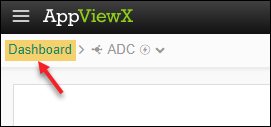
 in the Command bar
at the top of the screen.
in the Command bar
at the top of the screen.