Delete a Role
Note: You cannot delete a role that has active users in
it.
To delete a role from AppViewX:
-
Click
 and select Account > User group >
Quick Config.
and select Account > User group >
Quick Config.
- Navigate to Roles stage as part of the RBAC Configuration wizard flow.
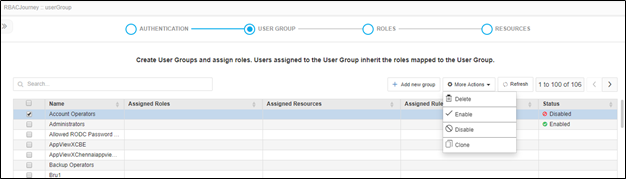
- On the roles list, select the checkbox beside the role you want to delete under the custom roles tab.
-
Click Delete under More Options dropdown.
Note: Out of the box roles can’t be deleted. Only custom roles can be deleted.
-
On the confirmation screen that pops up, click Yes.