Role
Each role assigns a specific set of permissions relating to the modules that can be accessed and the tasks that can be performed in each AppViewX module. The roles can be assigned only to a User group. The user groups that are assigned with a role will automatically inherit all the associated permissions. User groups can be assigned more than one role.
Once User group details are added into AppViewX, go to the Roles stage as part of wizard flow into AppViewX to perform the following functions:
- Out of the Box (OOB) roles are available for ADC, Certificates, Security, and Automation modules.
- OOB roles can be cloned, enabled, and disabled. OOB roles can’t be
updated/deleted.
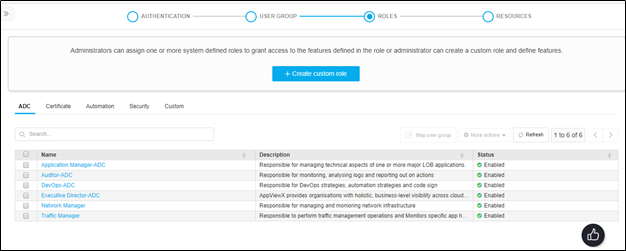
- Administrators can also create custom roles. Custom roles can be updated, deleted, enabled, and disabled.
- Users can either use OOB roles (if suits their needs) or custom roles to map to user groups.