Configuration Settings File
While installing a windows agent in the installation folder, the configuration file can be
found in the name of 'config.xml'. The configuration details can be modified before installing
the agent. The following are the details of the configuration: 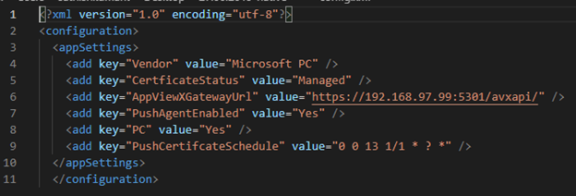
- Vendor: The vendor is the device category that has to be added to AppViewX. By default the value is 'Microsoft PC' for personal computers and 'IIS' in case the device is for Internet Information Service.
- Certificate Status: Monitored certificates can be just be monitored, while 'Managed' the certificate can be managed and monitored.
- AppViewXGatewayURL: The AppViewXGateway URL for pushing the certificate.
- PushAgentEnabled: When Yes certificates will be pushed to AppViewXGateway API. If No the push agent will be disabled.
- PC: If it is a personal computer the value is Yes. For the server, the value is No. On a server when the user makes an RDP connection, the user details will not be captured.
- PushCertificateSchedule: The time interval when the push agent gets triggered and the interval time is the cron expression.