LogOn Application
Service Behavior: When the Windows Agent is installed on the computer it runs as a
Windows service. The agent service can be viewed in services.msc.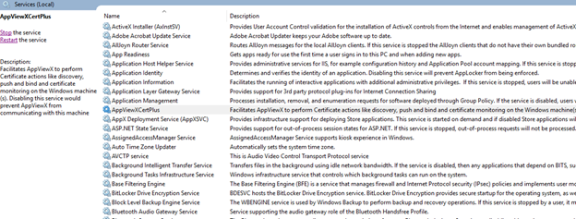
The Log On details can be viewed by navigating to Properties >> Log On
(tab) as shown below: 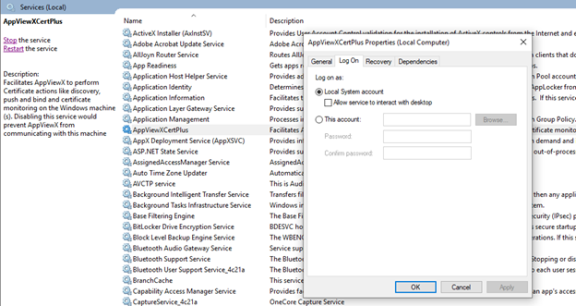
By default, the service runs under the Local System Account. If you want to fetch
the current user certificates, then the account has to be changed to the current user as shown
in the following image: 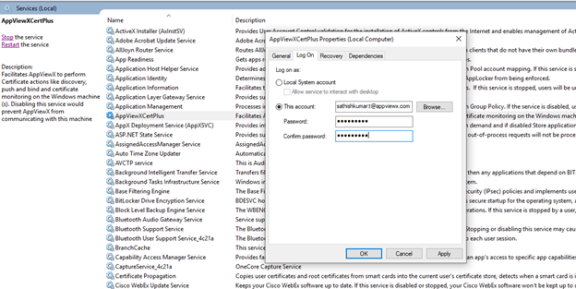
Note: A drawback of this approach is that the current user will not have
access to services.msc and when the user password is changed, then This account
details have to be updated or the service will fail to start.
So, for the convenience of the user, the LogOn Application is created and this LogOn
application has to be called through GPO during every user login.
So for the first login the user will be prompted to enter the password as shown in the
following image. 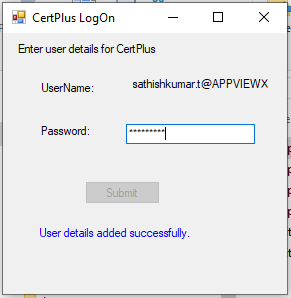 After saving it successfully, the user will not be
prompted for a password until there is a change in the password. This is so that the user does
not have to go to services.msc and configure the credential every time to fetch and
push the current user certificate.
After saving it successfully, the user will not be
prompted for a password until there is a change in the password. This is so that the user does
not have to go to services.msc and configure the credential every time to fetch and
push the current user certificate.