| Date of
expiry |
Date of expiry of the licenses |
| Expires in |
Number of days till the license
expires |
| Subscribed
licenses |
This includes the details of licenses of
all AppViewX products. |
| Used Objects (for ADC+
licenses) |
Each ADC+ license subscription allows the
user a fixed number of objects that they can use. This
is the number of ADC+ objects currently in use. |
| Unused Objects (For ADC+
licenses) |
Each ADC+ license subscription allows the
user a fixed number of objects that they can use. This
is the number of ADC+ objects left for use. |
| Used Certificates (for CERT+
licenses) |
Each CERT+ license subscription allows the
user a fixed number of certificates that they can manage
using this license. This is the number of CERT+
certificates currently being managed by the license.
|
| Unused Certificates (for CERT+
licenses) |
Each CERT+ license subscription allows the
user a fixed number of certificates that they can manage
using this license. This is the number of CERT+
certificates left. |
| Used Devices (for SECURITY+
licenses) |
Each SECURITY+ license subscription allows
the user a fixed number of devices that will be covered
under that subscription. This is the number of devices
currently in use. |
| Unused Devices (for SECURITY+
licenses) |
Each SECURITY+ license subscription allows
the user a fixed number of devices that will be covered
under that subscription. This is the number of devices
left for use. |
 icon.
icon.
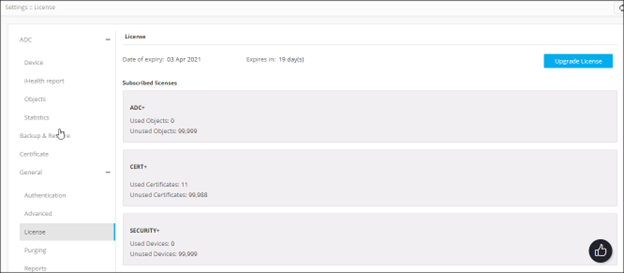 The page shows the following details: