Role Based Access Control
To get an overview of the actions authorized for a particular user:
-
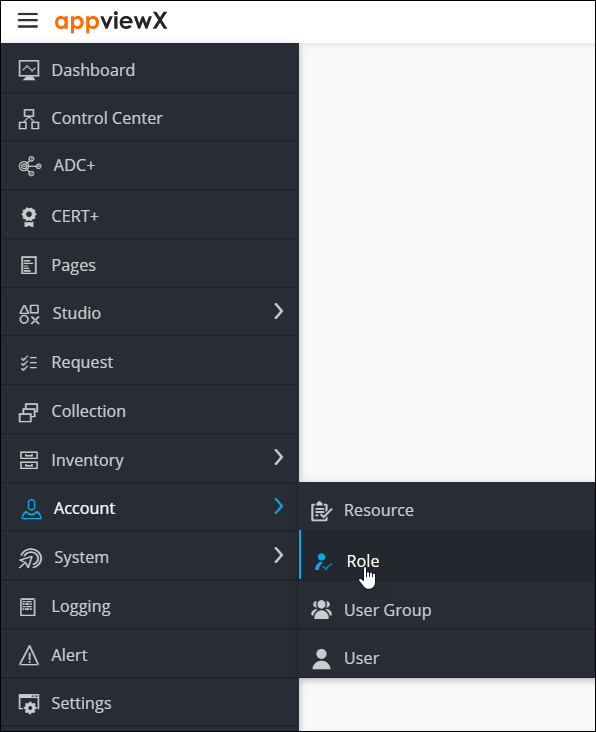
To access the navigation pane, hover the mouse over the
 icon.
icon.
-
From the menu displayed, select Account >
Role.
-
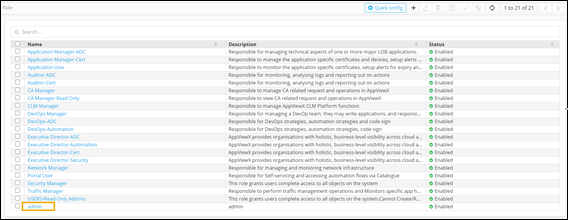
To see the access provided to a user, click on a username, for example,
admin.
-
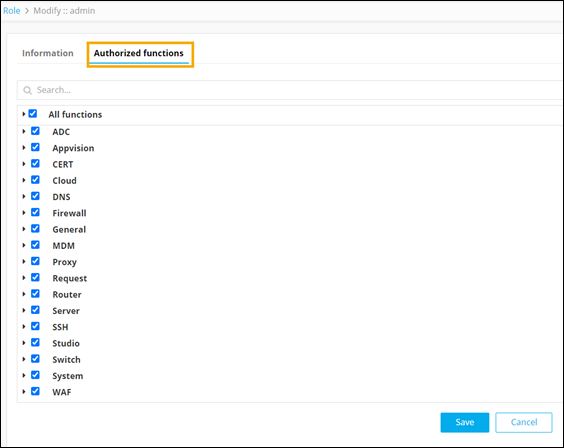
To see a list of actions defined for admin, click Authorized
functions.
-
To see a list of actions that are authorized for admin, under
Studio click Pages.
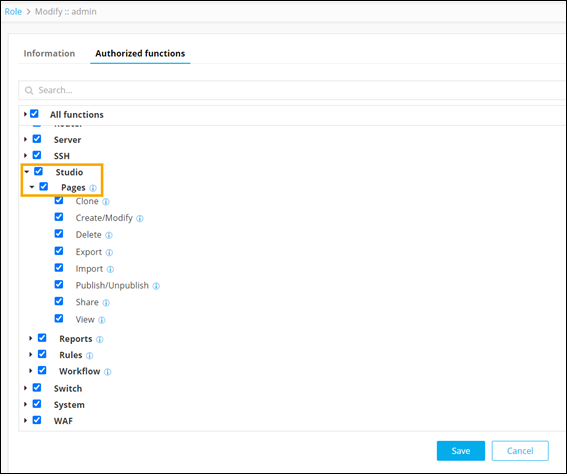
Note: A selected checkbox indicates that the actions are authorized for the selected user.The following table describes the various actions that can be authorized or restricted for a user in the Pages module:
Action Description Clone Provision to allow or restrict a user to clone an existing page. Create/Modify Provision to allow or restrict a user to create or modify an existing page. Delete Provision to allow or restrict a user to delete an existing unpublished page. Export Provision to allow or restrict a user to export an existing page. Import Provision to allow or restrict a user to import an existing page. Publish/Unpublish Provision to allow or restrict a user to publish or unpublish a page. Share Provision to allow or restrict a user to share a page. View Provision to allow or restrict a user to view the pages.