Downloading Intermediate Certificate
Download intermediate certificate is the action to download intermediate certificate in PEM format with or without its trust store certificates.
To download intermediate certificate,
- Log in to AppViewX application with valid credentials.
-
Click the menu button located in the upper left corner of the screen.
The left navigation pane appears.
-
Click CERT+.
The CERT+ left navigation pane appears.
- Expand CERTIFICATE INVENTORY.
-
Click Intermediate.
The Intermediate Certificate page appears.
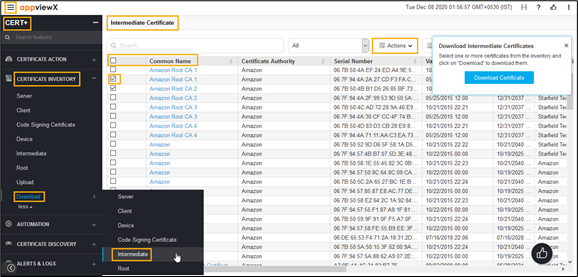
- In the Common Name column certificate list, select the desired certificate that you want to download.
- Click Actions, and then select Download Certificates from the list.
- To view details of the certificate, unzip the file and open the security certificate file.
- Click Details.