Configuring IAM Policy Based Discovery
-
In the IAM Policy based discovery popup window, under
Child Accounts, enter/select the following details:
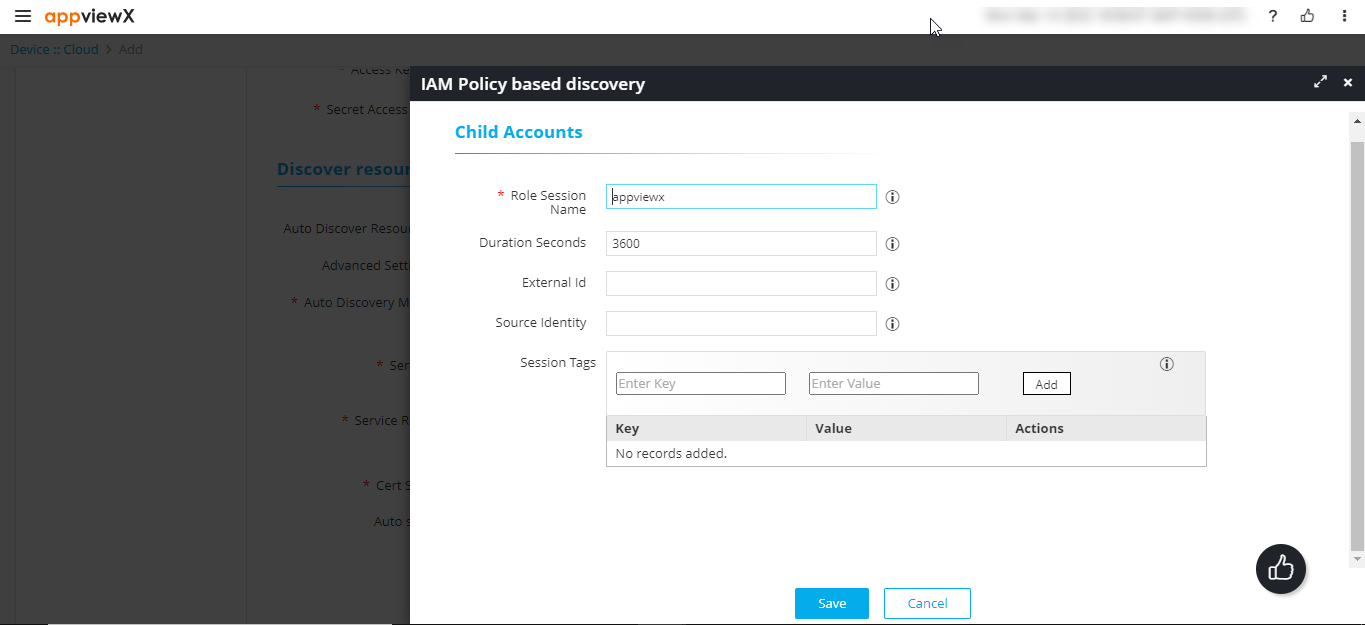
Field Description Role Session Name Role Session Name is an identifier for the assumed role session.
Use the Role Session Name to uniquely identify a session when the same rule is assumed by different principals or for different reasons.
Duration Seconds Enter the duration, in seconds, for which the credentials should remain valid.
Acceptable durations for IAM user sessions:- Minimum: 900 seconds (15 minutes)
- Maximum: 129,600 seconds (36 hours)
- Default: 3600 seconds (1 hour)
External Id External Id is a unique identifier that might be required when you assume a role in another account. Source Identity The source identity is specified by the principal that is calling the AssumeRole operation. Session Tags Session Tags are key-value pairs that you pass when you assume an IAM role or federate a user in AWS STS.
To create a session tag:- In the Enter Key field, enter a key for the key-value pair.
- In the Enter Value field, enter a value for the key-value pair.
- Click Add.
The added key-value pair is shown in the table below the fields.
-
Click Save.
The IAM Policy based discovery popup window is closed and you will be navigated back to the Discover resources section.Note:
- If the popup is closed without values entered for at least one field, then theIAM Policy based discovery checkbox will be unchecked.
- Values once saved in the popup will be stored and made available on the screen always, regardless of the number of times the IAM Policy Based Discovery checkbox is checked or unchecked, unless the values are updated.