Search Using Free Text Entries
This is the most common type of search. You can enter text in the search field and press Enter on your keyboard. The following search features and functionalities are supported:
-
Case insensitive keyword and string matching. For example, the search result for F5 would be f5_86.appviewx.com.
-
Exact match search strings through the use of double quotation marks around search terms. For example, "gs-f5-pe21.lab.appviewx.net".
-
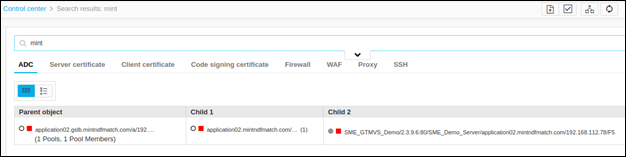
Entering only the application name in the search field is enough to find all the hierarchical details related to it.
-
Boolean AND and OR operators:
-
AND Operator - search results contain both terms that existed in the search query. For example, gs-f5-pe21.lab.appviewx.net AND default.
-
OR Operator - search results contain one or both terms that existed in the search query. For example, gs-f5-pe21.lab.appviewx.net OR default.
-
AND and OR - When a Boolean AND operator and an OR operator exist in the same search string, the AND operator is executed first by default. For example, gs-f5-pe21.lab.appviewx.net AND gs-f5-pe51.lab.appviewx.net OR default.
-
If parentheses appear in a Boolean query, the query components within the parentheses are executed first, followed by the query components outside the parentheses. For example, (gs-f5-pe21.lab.appviewx.net AND default) OR 3.4.5.6.
For example, typing only the application name in the search bar is enough to find all the hierarchical details related to it: