Share a Dashboard
Depending on your permissions or access rights, you might have the ability to share a dashboard.
To share a dashboard:
- Go to Menu > ADC+ > TRAFFIC MANAGEMENT > Dashboards.
- If you have more than one dashboard, in the dashboard table, click the name of the one you want to share.
-
When the dashboard opens, click the
 (Share) button in
the Command bar at the top of the screen.
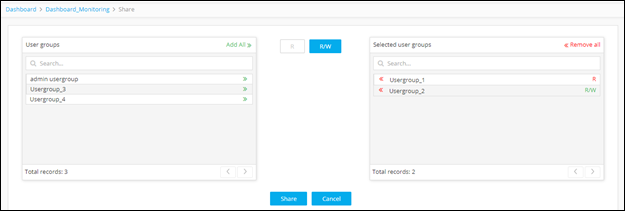
The Share screen appears.
(Share) button in
the Command bar at the top of the screen.
The Share screen appears. -
Begin the assignment process by clicking the
 (Read-Only) button.
Each subsequent role you assign will only have read-only
permissions within the dashboard.
(Read-Only) button.
Each subsequent role you assign will only have read-only
permissions within the dashboard.
-
In the Roles field, click the
(Assign item) icon beside each role you want to share the dashboard with on a read-only basis.
-
Click the
 (Read-Write) button.
Each subsequent role you assign will have read/write
permissions within the dashboard.
(Read-Write) button.
Each subsequent role you assign will have read/write
permissions within the dashboard.
-
In the Roles field, click the
(Assign item) icon beside each role you want to share the dashboard with on a read/write basis.
-
Click Share to finish.